Hide Price & Add to Cart
This section explains how to use Hide Price and Hide Add to Cart within Quote Logic, and how to combine this with other B2B apps such as BSS B2B Lock and Custom Pricing (BSS B2B Solution / Shopify B2B).
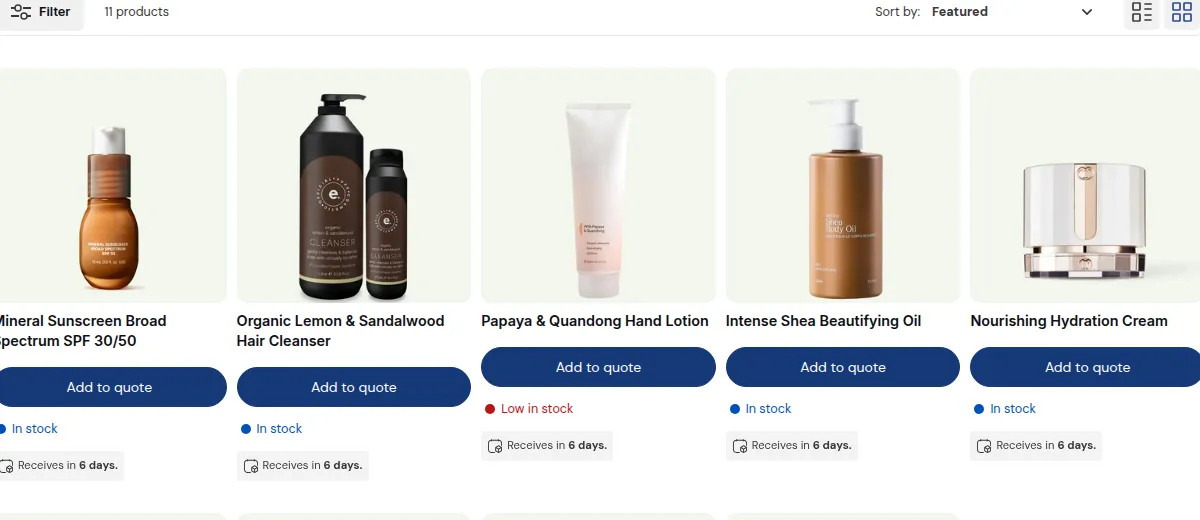
What your customers see on the storefront.
1. Overview
Section titled “1. Overview”With Quote Logic, you can control:
- Whether prices are shown or hidden
- Whether Add to Cart / Buy It Now buttons are available
- Whether customers must request a quote instead of placing a normal order
Price and Add to Cart settings are configured in each Quote Catalog (section Quote Catalogs of the quote logic page). The quote button is configured in Customize > Quote Button (under the Storefront preview of the logic page).
Typical patterns:
- Keep price + Add to Cart + Quote button
- Show price + Quote only (no Add to Cart)
- Hide price + Quote only (full “price on request” mode)
2. Common Scenarios
Section titled “2. Common Scenarios”A. “Call for Price” / “Request a Quote” Only
Section titled “A. “Call for Price” / “Request a Quote” Only”Goal: You do not want to show prices at all for certain products or customer groups. Customers must contact you first.
Configuration idea:
- Hide price
- Hide Add to Cart / Buy It Now
- Show Quote button with label like:
- “Request a quote”
- “Contact us for pricing”
Typical use cases:
- Highly customized products
- Large project-based orders
- Products with frequently changing costs (materials, FX, etc.)
B. Logged-In Customers Only (Hide Price for Guests)
Section titled “B. Logged-In Customers Only (Hide Price for Guests)”Goal: Show prices and purchase options only to logged-in customers. Guests see a quote button instead of prices. (A “Login to see price” message is a feature of BSS B2B Lock, not BSS B2B Quote.)
Configuration idea:
- Create logic A for All customers with a quote catalog set to Hide price, also hide Add To Cart & Buy It Now buttons, priority 50.
- Create logic B for Logged-in customers, priority 10, with a quote catalog set to Do not hide price.
- Logged-in customers match logic B first, so they see prices.
The storefront applies only one logic per customer: the matching logic with the highest priority (0 is the highest). Without logic B, logic A would also hide prices from logged-in customers.
Typical use cases:
- Wholesale sites where public visitors should not see B2B pricing
- Stores that require approval before showing prices
C. VIP-Only Pricing / RFQ
Section titled “C. VIP-Only Pricing / RFQ”Goal: Standard B2B customers see normal prices and checkout; VIP customers get special “request a quote” treatment or hidden prices.
Configuration idea:
- Tag VIP customers, e.g.
vip_b2b. - Create a quote rule with customer tags = vip_b2b and higher priority:
- Option 1: Show price + Add to Cart + Quote (for extra negotiation room).
- Option 2: Hide price + Quote only (for fully negotiated deals).
- Create a more general rule (lower priority) for regular B2B customers (e.g. show price, no RFQ or optional RFQ).
Typical use cases:
- Key accounts with special volume deals
- Distributors with contract-based pricing
- Early-access or pilot customers
3. How to Configure Hide Price & Add to Cart
Section titled “3. How to Configure Hide Price & Add to Cart”For each quote rule:
- In the Quote Catalogs section of the logic page, open the quote catalog.
- In Hide price setting, choose Do not hide price (optionally tick Hide ‘Add To Cart’ button and/or Hide ‘Buy It Now’ button) or Hide price, also hide Add To Cart & Buy It Now buttons (Growth plan or higher).
- Click Customize > Quote Button:
- Under Display quote button on, tick Product page, Collection page or Cart page (collection and cart pages need the Business plan).
- For the product page, pick a Position (Growth plan or higher), for example Under product price or Under ‘Add to cart’ button.
- To change the button text, go to Settings → Languages → Request for Quote, tab Quote Button.
- Save the quote rule and test on the storefront as:
- A guest
- A logged-in B2B customer
- A VIP / tagged customer (if applicable)
Use customer conditions + product conditions + price/button settings to precisely control the experience.
4. Combining with BSS B2B Lock
Section titled “4. Combining with BSS B2B Lock”BSS B2B Lock (Lock/Login/Hide Price app) controls access to pages and content. Quote Logic controls behavior on product pages (price visibility, quote button, Add to Cart).
You can combine them for stronger B2B workflows:
Example 1 – Fully private B2B catalog
Section titled “Example 1 – Fully private B2B catalog”- BSS B2B Lock:
- Lock collections and product pages for non-logged-in visitors.
- Redirect guests to a login or B2B registration page.
- Quote Logic:
- For logged-in B2B users, show hidden price + Quote only for certain collections.
- For other collections, show normal price + Add to Cart.
Example 2 – Public catalog, quotes for B2B only
Section titled “Example 2 – Public catalog, quotes for B2B only”- BSS B2B Lock:
- Do not lock product pages; keep catalog visible to everyone.
- Optionally hide only key B2B pages (e.g. wholesale onboarding).
- Quote Logic:
- For tagged B2B customers → show Quote button (optionally hide Add to Cart on specific products).
- For public visitors → show standard pricing and Add to Cart, no RFQ.
Key idea:
Use BSS B2B Lock to decide who can see pages, and use Quote Logic to decide what pricing/actions appear on those pages.
5. Combining with Custom Pricing (BSS B2B Solution / Shopify B2B)
Section titled “5. Combining with Custom Pricing (BSS B2B Solution / Shopify B2B)”If you are using BSS B2B Solution (custom pricing) or Shopify B2B catalogs, you can layer Quote Logic on top:
A. Custom pricing + optional RFQ
Section titled “A. Custom pricing + optional RFQ”Goal: Show personalized prices, but still allow customers to negotiate via RFQ.
- Custom pricing app or Shopify B2B:
- Controls base price per customer, company, or catalog.
- Quote Logic:
- Keeps price visible for transparency.
- Adds a Quote button so customers can ask for better terms for large orders.
B. Custom pricing + RFQ-only for special items
Section titled “B. Custom pricing + RFQ-only for special items”Goal: Most products use custom pricing; some sensitive SKUs are “quote only”.
- Custom pricing logic sets base prices for all products.
- Quote Logic rule for specific collections/tags:
- Hide price and Add to Cart.
- Show Quote only.
- Other products still show custom prices and normal checkout.
C. Shopify B2B catalogs + RFQ per Company/Location
Section titled “C. Shopify B2B catalogs + RFQ per Company/Location”Goal: Respect catalog pricing per Company/Location, with RFQ as an extra option.
- Shopify B2B catalogs:
- Control prices per Company/Location.
- Quote Logic in B2B Store mode:
- Targets specific Companies/Locations with different hide/show rules.
- Example:
- Company A: sees catalog prices + Quote button.
- Company B: certain products are quote-only, hiding catalog price.
By combining Hide Price & Add to Cart with BSS B2B Lock and custom pricing, you can design a flexible B2B experience where:
- The right customers see the right products
- Pricing visibility matches your strategy
- RFQ is available exactly where negotiation is needed, without breaking normal Shopify checkout flows.