
Designing a Clean Locked Experience
A good B2B lock should feel intentional and helpful, not like a broken page.
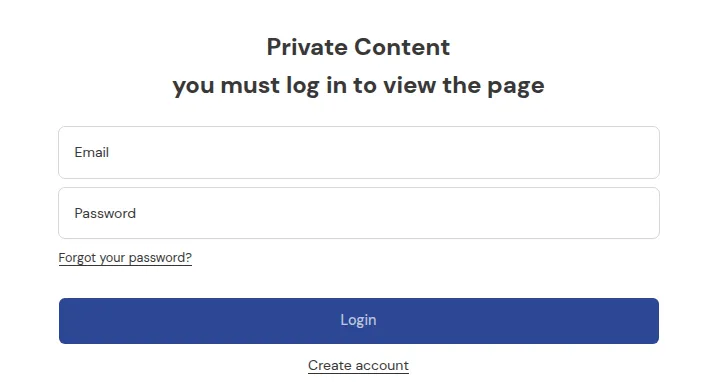
What your customers see on the storefront.
A good B2B lock should feel intentional and helpful, not like a broken page.
This page focuses on UX and messaging:
- What to say on lock screens
- How to avoid dead ends
- How to guide visitors toward the “right” state (login, register, contact)
1. Principles of a good locked experience
Section titled “1. Principles of a good locked experience”A clean locked experience should:
- Explain what’s happening
- “This content is for wholesale customers only.”
- Explain what to do next
- “Log in” / “Create a wholesale account” / “Contact us”.
- Avoid dead ends
- Never just say “Access denied” with no path forward.
In other words:
Every lock message should answer:
“Who is this for?” + “How can I become that?”
2. Core messaging patterns
Section titled “2. Core messaging patterns”Here are simple, reusable patterns:
For locked prices
Title: Login to see prices
Body:
“We reserve pricing for registered customers. Please log in to your account to view prices, or create a wholesale account to get started.”
Buttons:
- “Log in”
- “Apply for wholesale account”
For locked collections
Title: Wholesale catalog access
Body:
“This collection is reserved for approved B2B customers. If you already have an account, please log in. If not, you can apply for wholesale access below.”
Buttons:
- “Log in to my account”
- “Apply for B2B access”
For locked pages/portals
Title: B2B portal access only
Body:
“This portal is for our B2B customers and partners. Please log in with your registered email. If you’re interested in becoming a partner, contact us and we’ll be happy to help.”
Buttons:
- “Log in”
- “Contact us”
3. Avoiding dead-end pages
Section titled “3. Avoiding dead-end pages”Common mistakes:
- Showing a generic “You don’t have permission to view this page” with no actions.
- Using techy or scary language like “Forbidden”, “Error 403”, “Access denied”.
- Not telling users how to gain access.
To avoid this:
- Always include at least one actionable button:
- Login
- Register / Apply
- Contact
- Avoid jargon. Use simple, friendly language:
- “Looks like this area is just for our wholesale customers.”
4. Consistency with your login model
Section titled “4. Consistency with your login model”With Shopify’s newer Email + OTP flows and optional password login:
- Use neutral wording:
- “Log in to your account”
- “Check your email for a login code” (if you want to be explicit)
- Avoid messages that explicitly reference passwords if you mainly use OTP.
Example:
- ✅ “Please log in to your account to continue.”
- ❌ “Enter your password to see prices.” (if your store uses OTP now)
Keep your lock messages, registration pages, and onboarding emails aligned so customers are not confused by mixed terminology.
5. Microcopy tips
Section titled “5. Microcopy tips”Small wording changes make a big difference:
- Be friendly but clear:
- “This page is for our wholesale customers” vs “You are not allowed here.”
- Be specific:
- “Apply for a wholesale account” vs “Register” (what kind of registration?)
- Add benefit framing where appropriate:
- “Apply for a wholesale account to access special pricing and bulk ordering.”
6. Testing with real users
Section titled “6. Testing with real users”If possible:
- Ask a few B2B customers or colleagues to:
- Try accessing locked content as a guest.
- Follow the prompts to get access.
- Ask:
- “Was it clear who this was for?”
- “Did you know what to do next?”
- “Did any messages feel confusing or too technical?”
Then refine your copy accordingly: open the lock, click Customize message on the Preview card, and edit the text in Preview & customize message.
7. Summary
Section titled “7. Summary”A clean locked experience is:
- Clear – users understand what’s happening.
- Guided – they see the next step right away.
- Consistent – matches your login and B2B onboarding model.
If you treat your lock screens as mini landing pages, not just error messages, you’ll convert the right visitors into approved B2B customers instead of scaring them away.
Still Need Help?
Section titled “Still Need Help?”If you have questions or need assistance configuring BSS B2B Lock, our dedicated support team is here to help.
- In-App Assistance: Click Need help? or use the in-app chat button within BSS B2B Lock.
- Email Support: Contact us at [email protected] with your store URL and specific rule details.