
Silver / Gold Segmentation Pattern
This page explains a common tiered segmentation strategy:
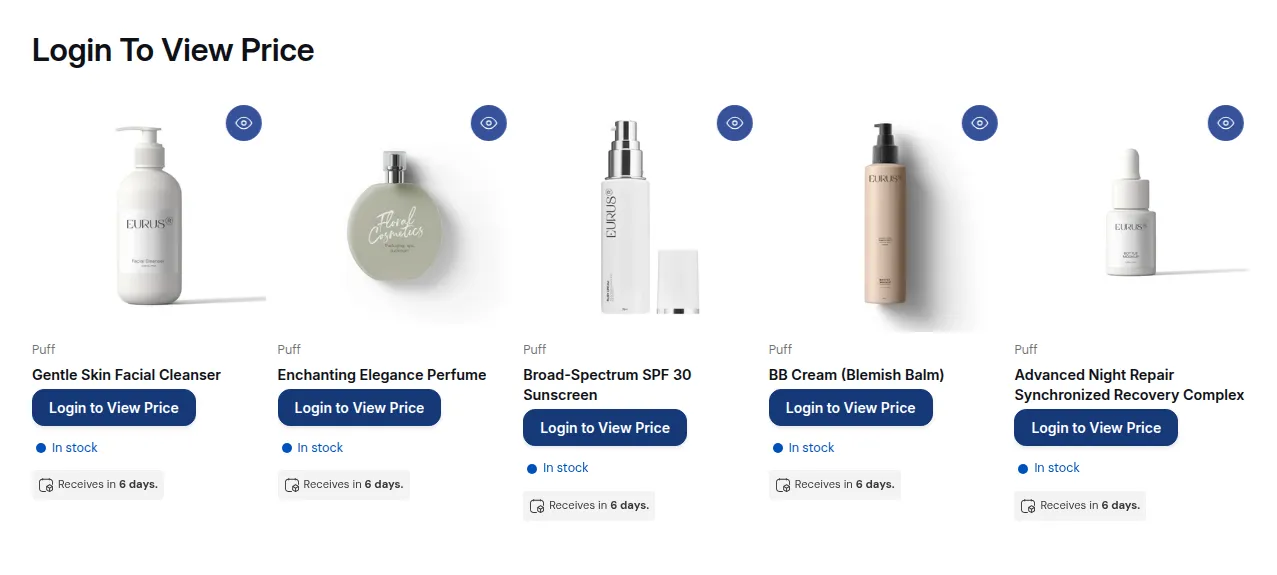
What your customers see on the storefront.
This page explains a common tiered segmentation strategy:
Silver customers see Silver products.
Gold customers see Gold products (and possibly Silver too).
You can expand this pattern to Bronze / Silver / Gold / Platinum later.
1. When to use Silver / Gold segmentation
Section titled “1. When to use Silver / Gold segmentation”Use this pattern when:
- You have tiered pricing or catalog for different customer levels.
- You want:
- Entry-level customers to see a limited set.
- Higher tiers to see more or better offers.
- You still want everything managed in one Shopify store.
2. Tag design
Section titled “2. Tag design”Create clear tier tags:
silvergold
Optional extras:
platinumvip
Make sure each customer has one main tier tag (or a clearly defined combination) based on your business rules.
3. Catalog design options
Section titled “3. Catalog design options”You can structure products in two main ways:
Option A – Separate collections per tier
- Collection:
Silver Products - Collection:
Gold Products
Option B – Mixed collections, products themselves indicate tier
- All products in one or few collections
- Use product tags or internal logic to group them by tier
- Use BSS B2B Lock rules to hide/show product cards
Option A is usually easier to manage visually; Option B gives more flexibility but can be trickier to keep tidy.
4. Rule setup – Silver only
Section titled “4. Rule setup – Silver only”Goal
Silver customers should see only the Silver-tier catalog.
If you use collections:
Step 1 – Lock Target
- Target: Collections → Specific
- Select:
Silver Productscollection
Step 2 – Access & Message
- Condition:
- User type → Tagged customers – Must have specific tags →
silver
- User type → Tagged customers – Must have specific tags →
Result:
- Silver customers: see Silver collection.
- Everybody else: do not see Silver collection.
If you want Silver-only (no Gold access), you’ll choose later whether Gold customers also get Silver in addition to Gold.
5. Rule setup – Gold (and optionally Silver + Gold)
Section titled “5. Rule setup – Gold (and optionally Silver + Gold)”There are two common ways to treat Gold customers:
Option 1 – Gold sees Gold only
- Gold has a completely separate catalog.
Step 1 – Lock Target
- Target: Collections → Specific
- Select:
Gold Products
Step 2 – Access & Message
- Condition:
- User type → Tagged customers – Must have specific tags →
gold
- User type → Tagged customers – Must have specific tags →
Silver customers won’t see Gold collection; Gold won’t see Silver collection (unless you create additional rules).
Option 2 – Gold sees both Silver and Gold
This is more common: Gold tier gets access to everything Silver gets, plus extra.
You can do this two ways:
Way A – Give Gold tag access to both collections
- Lock:
Silver Products
- Step 1 – Lock Target:
- Target: Collections → Specific → Silver Products
- Step 2 – Access & Message:
- Rule 1: User type → Tagged customers with
silver - OR click + Add rule → Rule 2: User type → Tagged customers with
gold
- Rule 1: User type → Tagged customers with
- Lock:
Gold Products
- Step 1 – Lock Target:
- Target: Collections → Specific → Gold Products
- Step 2 – Access & Message:
- Condition:
- User type → Tagged customers with
gold
- User type → Tagged customers with
- Condition:
Result:
- Silver customers:
- See only Silver collection.
- Gold customers:
- See both Silver and Gold collections.
Way B – Use separate tags but a single rule per collection
Similar idea, just simplified:
- For
Silver Productslock, let in customers taggedsilverorgold(one Tagged customers rule per tag: separate Rules are OR). - For
Gold Productslock, use condition: Tagged customers withgold.
6. Messaging & UX
Section titled “6. Messaging & UX”In your lock messages and onboarding flows:
- Make it clear what each tier gets:
- “Silver customers have access to Silver catalog.”
- “Gold customers have access to Gold catalog (plus Silver catalog in some setups).”
- Use BSS B2B Lock lock messages for unauthorized visitors (Preview card → Customize message in Step 2):
- “This collection is only for Gold tier customers. Please contact us if you’d like to upgrade your account.”
This helps customers understand why they do or don’t see certain collections.
7. Extending the pattern
Section titled “7. Extending the pattern”You can extend Silver/Gold logic to:
bronze→ limited introductory catalogsilver→ more products / better pricinggold→ full catalog, best pricingplatinum→ custom or enterprise products
Each tier then gets:
- One or more collections
- One or more BSS B2B Lock rules keyed off its tag
As long as you keep:
- Tag names consistent, and
- Collections logically grouped by tier,
you can scale your B2B segmentation without making your rules unmanageable.
Still Need Help?
Section titled “Still Need Help?”If you have questions or need assistance configuring BSS B2B Lock, our dedicated support team is here to help.
- In-App Assistance: Click Need help? or use the in-app chat button within BSS B2B Lock.
- Email Support: Contact us at [email protected] with your store URL and specific rule details.