
Checkout Lock
Checkout Lock lets you control who is allowed to complete checkout, not just who can see products or prices.\
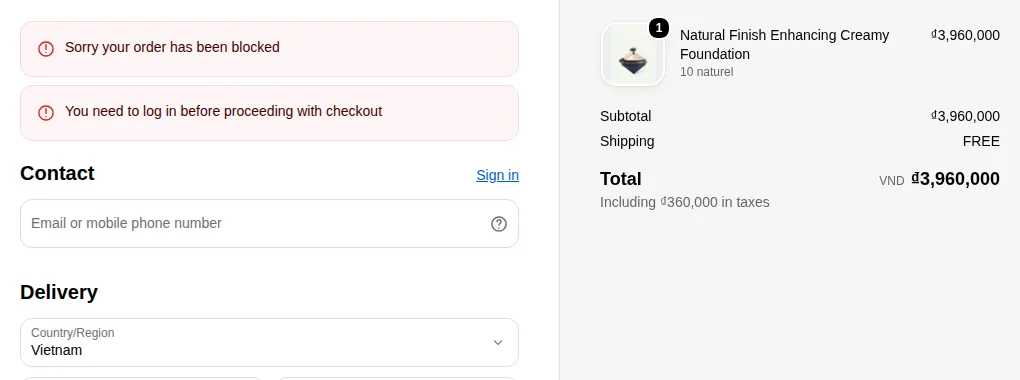
What your customers see on the storefront.
Checkout Lock lets you control who is allowed to complete checkout, not just who can see products or prices.
This is especially useful for blocking bots, fraudulent orders, or unapproved customers at the final step.
1. Prerequisites
Section titled “1. Prerequisites”Before using Checkout Lock, make sure:
Having this clear upfront makes rule configuration much easier.
2. Creating a Checkout Lock rule
Section titled “2. Creating a Checkout Lock rule”You’ll see a configuration screen similar in spirit to the Rule Builder, but focused specifically on checkout.
3. Rule fields
Section titled “3. Rule fields”Typical fields you’ll see in a Checkout Lock rule:
Basic info
Section titled “Basic info”- Rule name
- Internal name to identify what the rule does, e.g.:
Block checkout for non-wholesale customersRestrict checkout for restricted products
- Internal name to identify what the rule does, e.g.:
- Status (Active / Inactive)
- Active → rule is enforced.
- Inactive → rule is saved but not applied.
Conditions (who/what gets blocked)
Section titled “Conditions (who/what gets blocked)”Checkout rules usually work as “block if…” logic.
You define when checkout should be denied.
Common condition types:
- Customer-based conditions
- Customer is not tagged with
wholesale/approved. - Customer email is on a blacklist/whitelist.
- Customer is not tagged with
- Cart/content-based conditions
- Cart contains specific products or collections.
- Cart total is below or above certain thresholds.
- Cart contains restricted products (e.g., certain categories or tags).
- Location/geo-based conditions (if available)
- Customer’s shipping country/region is restricted.
- IP/location is in a blocked range.
You can usually combine multiple conditions using AND/OR logic, for example:
- Block checkout if:
- Customer is not tagged
wholesaleAND cart contains products from the “Wholesale” collection.
- Customer is not tagged
- Block checkout if:
- Shipping country is not in your allowed list.
Action & message
Section titled “Action & message”When conditions are met (i.e., the rule is triggered), you specify what happens:
- Block behavior
- Prevent the order from being placed.
- Stop the checkout at a certain step.
- Error / info message shown to the customer
- Short message displayed at checkout explaining why the order can’t be completed.
- Examples:
- “This checkout is only available for approved wholesale customers. Please log in with your wholesale account or contact us.”
- “We are currently unable to process orders to your region. Please contact support for more information.”
- Support or next-step link (if supported)
- Link to contact form, B2B application form, or email address.
Good messages reduce confusion and guide legitimate customers toward the right next step.
4. Logic examples
Section titled “4. Logic examples”Here are some common patterns you can implement with Checkout Lock:
1) Allow only approved wholesale customers to checkout
Section titled “1) Allow only approved wholesale customers to checkout”- Rule name:
Checkout only for wholesale customers - Conditions:
- Customer is not tagged with
wholesale
- Customer is not tagged with
- Action: Block checkout
- Message:
- “Checkout is available only for approved wholesale accounts. Please apply for a wholesale account or log in with your approved email.”
Result:
- Wholesale-tagged customers can check out normally.
- Guest or non-tagged customers are blocked at checkout.
2) Block checkout when restricted products are in cart
Section titled “2) Block checkout when restricted products are in cart”- Rule name:
Block restricted products checkout - Conditions:
- Cart contains products from collection
Restricted - Customer is not tagged
approved
- Cart contains products from collection
- Action: Block checkout
- Message:
- “Your cart contains items that require additional approval. Please contact us before placing this order.”
Result:
- Only approved/tagged customers can purchase restricted items.
- Other customers can still buy non-restricted products (if you allow it via catalog rules).
3) Block checkout by region
Section titled “3) Block checkout by region”- Rule name:
Block checkout outside allowed regions - Conditions:
- Shipping country is not in
US, CA, EU(example)
- Shipping country is not in
- Action: Block checkout
- Message:
- “At this time, we can only process orders from selected regions. Please contact us to discuss options for your country.”
Result:
- Helps control logistcs, legal compliance, or region-specific contracts.
5. Testing & best practices
Section titled “5. Testing & best practices”1. Test with multiple scenarios
- Use different test customers:
- Guest
- Retail customer
- Wholesale/approved customer
- Try carts with:
- Only normal products
- Only restricted products
- Mixed carts
2. Start with simple rules
- Begin with a single, clear condition (e.g., block everyone not tagged
wholesale). - Add more complex conditions gradually to avoid unexpected blocks.
3. Align with catalog locks
- Use Checkout Lock as the final safeguard.
- Still use product/collection locks to hide content from the wrong users earlier in the journey.
4. Keep messages human and clear
- Tell customers why the checkout is blocked.
- Tell them what to do next (log in, contact support, request approval).
With Checkout Lock configured properly, you get a strong last line of defense against bots, fraud, and unauthorized orders, while keeping the experience smooth for legitimate, approved customers.
Still Need Help?
Section titled “Still Need Help?”If you have questions or need assistance configuring BSS B2B Lock, our dedicated support team is here to help.
- In-App Assistance: Click Need help? or use the in-app chat button within BSS B2B Lock.
- Email Support: Contact us at [email protected] with your store URL and specific rule details.