
Secret Collection for Approved B2B Customers
This page focuses on a popular integration pattern:
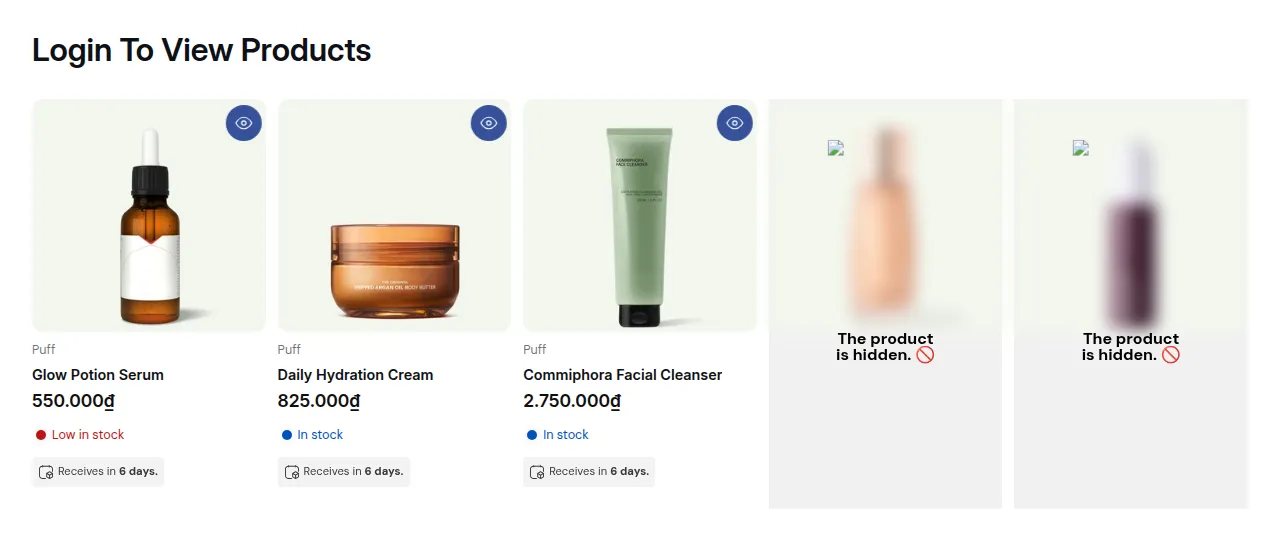
What your customers see on the storefront.
This page focuses on a popular integration pattern:
Use BSS B2B Solution for approval + tags
Use BSS B2B Lock to create a secret B2B-only collection
This is a more integrated and polished version of the “Secret B2B collection” recipe (see section 3.9).
1. What you’re building
Section titled “1. What you’re building”You want:
- A B2B-only collection that:
- Doesn’t appear to retail shoppers.
- Isn’t visible to guests or searchers.
- Only approved B2B customers should see it:
- They apply via B2B registration form.
- You approve them.
- They log in and the B2B catalog appears.
2. Step 1 – Prepare B2B tags via registration app
Section titled “2. Step 1 – Prepare B2B tags via registration app”In BSS B2B Solution:
- Set up a B2B registration form (e.g., “Apply for wholesale account”).
- Configure the approval step so that approved customers receive a tag, for example:
b2b-approved- Or more specific tags if needed (
wholesale,eu-b2b, etc.).
- Test once:
- Submit a dummy application.
- Approve it.
- Confirm the test customer gets the correct tag.
3. Step 2 – Create the B2B-only collection in Shopify
Section titled “3. Step 2 – Create the B2B-only collection in Shopify”In Shopify Admin → Products → Collections:
- Create a new collection called something like:
B2B Only,Wholesale Catalog,Distributor Products, etc.
- Add all products you want to be available only for approved B2B customers.
- Don’t add it to main navigation yet (you can later add B2B-only menus for logged-in customers if you like).
4. Step 3 – Lock the collection in BSS B2B Lock
Section titled “4. Step 3 – Lock the collection in BSS B2B Lock”In BSS B2B Lock:
- Go to Locks → Add lock rule, select Create my own lock and click Continue.
- Step 1 – Lock Target
- What do you want to lock?: Collections
- Which collections to restrict?: Specific, then select your B2B-only collection (e.g.,
B2B Only).
- Step 2 – Access & Message
- Condition: User type → Tagged customers – Must have specific tags →
b2b-approved - You can also let in more tags if needed, such as
wholesale:- Click + Add rule and add a second Tagged customers condition with
wholesale. Separate Rules are OR:b2b-approvedORwholesale.
- Click + Add rule and add a second Tagged customers condition with
- Lock message for blocked visitors: on the Preview card, click Customize message and edit the text:
- Title: “B2B catalog access only”
- Body: “This collection is reserved for approved B2B customers. Please apply for a wholesale account or log in with your approved email.”
- Add links:
- “Apply for B2B account” → link to your registration form (from BSS B2B Solution)
- “Login” → link to login page (OTP or password login, depending on your setup)
- Condition: User type → Tagged customers – Must have specific tags →
- Step 3 – Exclude Pages
- Leave the defaults unless you need to keep some pages unlocked.
Click Save.
5. Step 4 – End-to-end behavior
Section titled “5. Step 4 – End-to-end behavior”After everything is wired:
- Retail visitors / guests
- Do not see the B2B collection in navigation.
- If they somehow hit the URL, they see your lock message with “Apply for B2B account”.
- Pending applicants (not yet approved)
- Same as guests until you approve them (no
b2b-approvedtag yet).
- Same as guests until you approve them (no
- Approved B2B customers
- Tag is added automatically on approval.
- After login, BSS B2B Lock sees
b2b-approved - The B2B collection is now visible and accessible.
Result:
A self-contained B2B experience:
- Smooth self-service entry via registration form.
- Manual or semi-automated approval step.
- Automatic unlocking of the B2B-only collection, powered by BSS B2B Lock.
6. Where this fits with the rest of the guide
Section titled “6. Where this fits with the rest of the guide”This pattern builds directly on:
- Section 3.9 – Create a secret collection just for approved B2B customers
- Section 6 – Tags, Segments & Catalog Strategy
You can reuse the same idea for:
- Region-based B2B collections (tags like
eu-b2b,us-b2b) - Tier-based catalogs (tags like
silver,gold) - Special partner-only product lines
Still Need Help?
Section titled “Still Need Help?”If you have questions or need assistance configuring BSS B2B Lock, our dedicated support team is here to help.
- In-App Assistance: Click Need help? or use the in-app chat button within BSS B2B Lock.
- Email Support: Contact us at [email protected] with your store URL and specific rule details.