
Hide Products & Collections
When you use the Products or Collections target in Step 1 – Lock Target, you’re not just hiding prices – you’re hiding the items themselves from parts of your storefront.
When you pick Products or Collections in What do you want to lock? in Step 1 – Lock Target, you’re not just hiding prices – you’re hiding the items themselves (or their pages) from parts of your storefront.
This is different from “Price and add to cart”:
- Price and add to cart → product is visible, price is not.
- Products / Collections → product or collection can disappear entirely for blocked visitors, or only its page is locked.
1. What the “Products” target does
Section titled “1. What the “Products” target does”Target: products.
When you choose Products as the target:
- Under Restricted products, choose All product, By tags, By collections, or Specific products. With Specific products, search or open the Select products picker.
- Under Product Visibility Control, choose how blocked visitors experience these products:
- Fully Hide Product: “Completely removed from storefront (no trace in collections, search, or product page).” Products are removed from product grids (collections, search results, related products, etc.) and the product page is locked.
- Only lock product page: “Product stays visible everywhere, but the product page shows “Access Denied.”” Product cards stay in collections and search; opening the product shows the lock message.
- Under Search visibility:
- Hide price on Google search: “Price of products will be hidden from your website on Google search results.” The notice above it reads: “Your store must be public. Updates may take up to 24 hours for Google to re-index.”
- Hide from navigation menu (ticked by default): “Applies when links to these product appear in navigation menu”. It applies to both visibility modes.
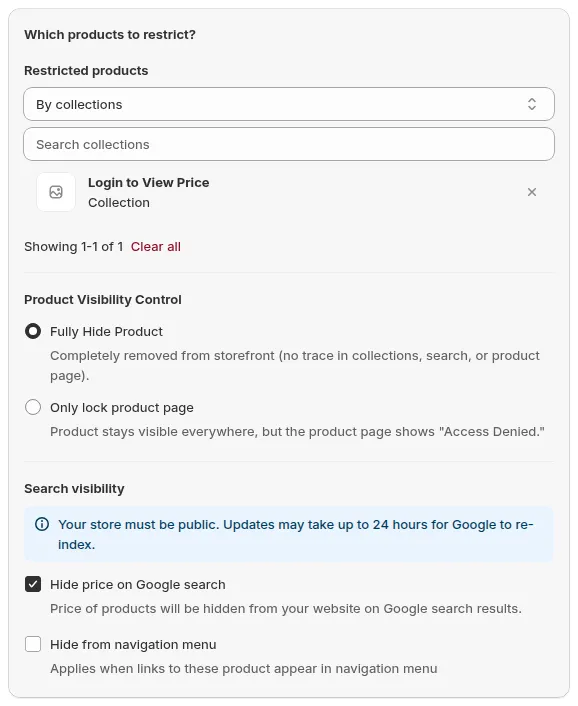
Fully Hide Product removes the products from the storefront.
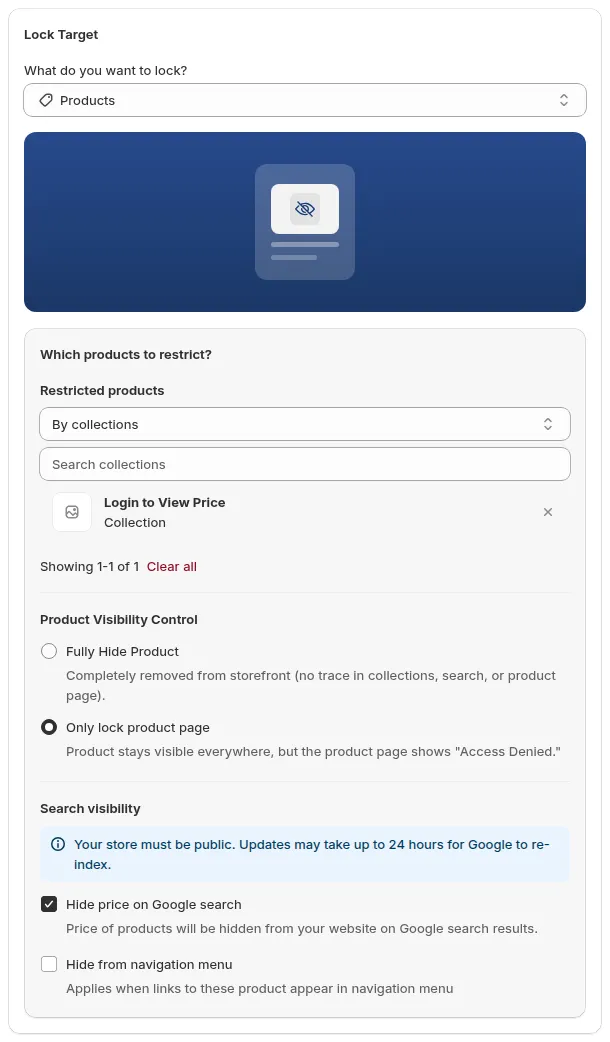
Only lock product page keeps products in listings and locks the product page.
Typical uses
- Wholesale-only products that retail customers must never see (Fully Hide Product).
- Exclusive SKUs for partners, distributors, or VIP customers.
- Products that can be discovered in listings, but whose details are for approved buyers only (Only lock product page).
- Products still in testing or beta, only for selected accounts.
2. What the “Collections” target does
Section titled “2. What the “Collections” target does”Target: whole collections.
When you choose Collections:
- Under Which collections to restrict?, choose All or Specific. With Specific, search or open the Select collections picker.
- Under Visibility settings, choose what blocked visitors lose. All 4 are ticked by default:
- Hide collection cards: “Applies to all collection cards within the selected collections.”
- Hide product cards: “Applies to all product cards within the selected collections.”
- Hide product pages: “Applies to all product pages within the selected collections.”
- Hide from navigation menu: “Applies when links to these collection appear in navigation menu”
- If someone opens the collection URL directly, they see a lock message instead of the product grid.
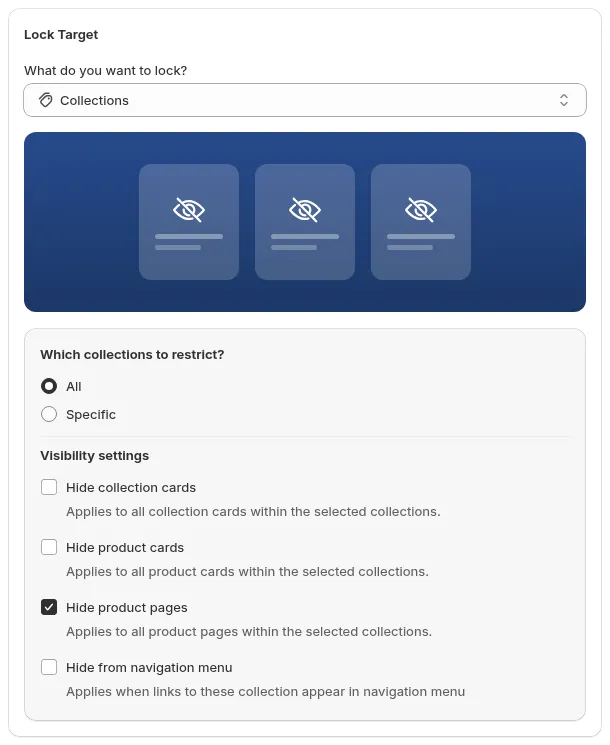
Collections: choose the collections, then the Visibility settings.
Typical uses
- Wholesale/B2B catalog separated into its own collection(s).
- Distributor-only collections by region or tier.
- VIP collections that should not show up in public navigation.
3. Hide product cards vs lock collections
Section titled “3. Hide product cards vs lock collections”It’s important to understand the difference between hiding product cards and locking collections:
Hiding product cards (Products target → Fully Hide Product)
Section titled “Hiding product cards (Products target → Fully Hide Product)”- You keep the collection itself visible (e.g., “All products” or “New arrivals”).
- Inside that collection, individual product cards are hidden based on your rules.
- Result for blocked visitors:
- They see the collection page, but some products simply don’t appear in the grid.
- The layout may adjust automatically based on your theme (e.g., items shift left, no blank slots).
This is useful when:
- You want mixed collections where some products are public and some are restricted.
- You don’t want to create separate collections for every audience.
Locking collections (Collections target)
Section titled “Locking collections (Collections target)”- The collection as a whole is gated.
- Blocked visitors, with the default Visibility settings:
- Don’t see that collection in menus or collection lists.
- Don’t see its products in grids, and can’t open their product pages.
- If they somehow open the exact collection URL, they see a lock screen instead of any grid.
- Untick a Visibility settings option to keep that part visible: e.g. untick Hide collection cards to keep the collection listed while its products stay hidden.
This is useful when:
- You want very clean separation between retail and wholesale.
- Each audience should have its own “catalog view” without overlap.
4. How rules affect collections, search, and grids
Section titled “4. How rules affect collections, search, and grids”Because hiding products/collections affects how things render visually, it’s helpful to know what to expect in different places.
A. Collection pages (product grids)
Section titled “A. Collection pages (product grids)”If you fully hide products (Products → Fully Hide Product):
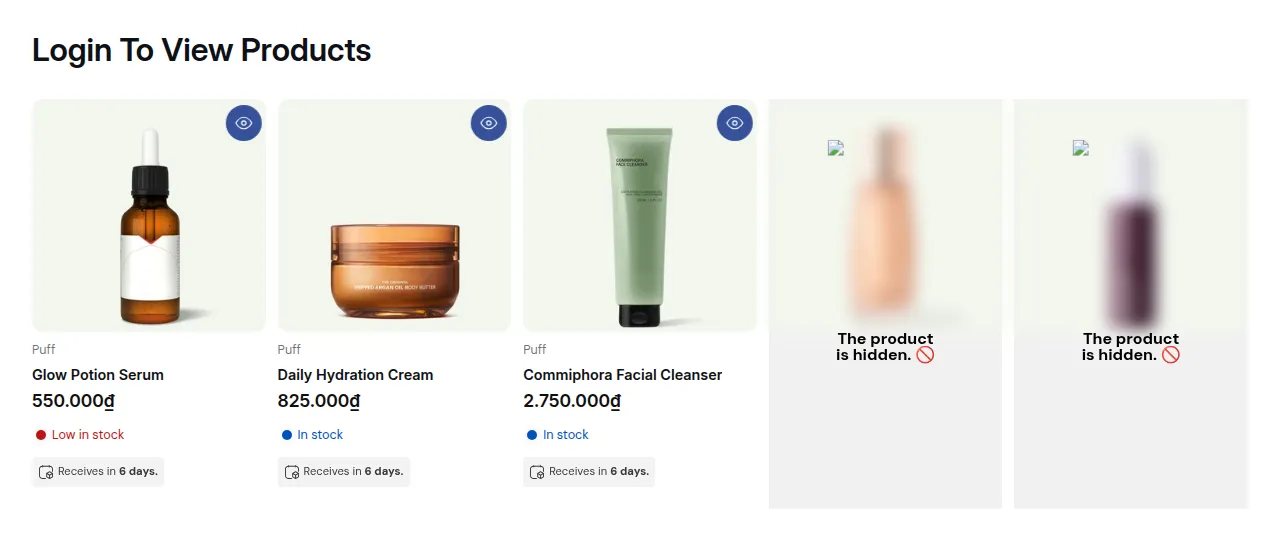
- Blocked visitors:
- Won’t see those products in the grid.
- Remaining products shift to fill the grid (no item should show with a visible product card, but if your theme expects a fixed number of items, you may see layout differences).
If you lock the collection (Collections target):
- Blocked visitors:
- Won’t see the collection in navigation or collection lists (with Hide from navigation menu and Hide collection cards ticked).
- Opening the collection URL shows a lock message instead of any grid.
B. Search results
Section titled “B. Search results”- If products are hidden:
- Blocked visitors generally won’t see them in search results, depending on theme and integration.
- If collections are hidden:
- Collection links may not show in search (again theme-dependent), and if opened, they’re locked.
If search is critical to your UX, always test:
- As a guest/unapproved user.
- As an approved/tagged user.
Make sure search results match your expectations for each segment.
C. Featured collections and product blocks on homepage
Section titled “C. Featured collections and product blocks on homepage”If your theme uses featured collections or product sliders on the homepage:
- Products → Fully Hide Product:
- Restricted products simply don’t appear for blocked users; the slider shows fewer products.
- Collections:
- If you’ve hidden the featured collection itself, blocked users may:
- Not see that section at all, or
- See a message/empty state depending on how the theme handles it.
- If you’ve hidden the featured collection itself, blocked users may:
Always review your homepage and key landing pages after creating or editing hide rules.
D. Handling “blank” or unexpected layout gaps
Section titled “D. Handling “blank” or unexpected layout gaps”In some themes, if products are removed at runtime, you might see:
- Empty spaces where products would have been.
- Slightly uneven grids when many products are hidden.
If that happens:
- Prefer hiding whole collections instead of many individual products, or
- Create dedicated wholesale-only collections and hide the entire collection from non-B2B users, or
- Reduce mixing of public and restricted products in the same collection.
This gives a cleaner visual experience, especially for non-B2B visitors.
5. Choosing the right approach
Section titled “5. Choosing the right approach”Use this as a quick decision guide:
- I want a clean, separate B2B catalog, invisible to retail
→ Use the Collections target for wholesale collections. - I want some products in a collection to be wholesale-only
→ Use the Products target with Fully Hide Product on those SKUs and test collection grids. - I want products to stay discoverable, but only approved buyers can open them
→ Use the Products target with Only lock product page. - I want one URL to behave completely differently for B2B vs B2C
→ Combine the Products or Collections target with User type → Tagged customers and clear lock messages.
Once you understand the difference between hiding products and collections, you can design catalog structures that both look good and respect your B2B rules across all parts of the storefront.
Still Need Help?
Section titled “Still Need Help?”If you have questions or need assistance configuring BSS B2B Lock, our dedicated support team is here to help.
- In-App Assistance: Click Need help? or use the in-app chat button within BSS B2B Lock.
- Email Support: Contact us at [email protected] with your store URL and specific rule details.