
Frequently Asked Questions (FAQ)
This FAQ is grouped into question clusters so you can quickly find the topic you care about.
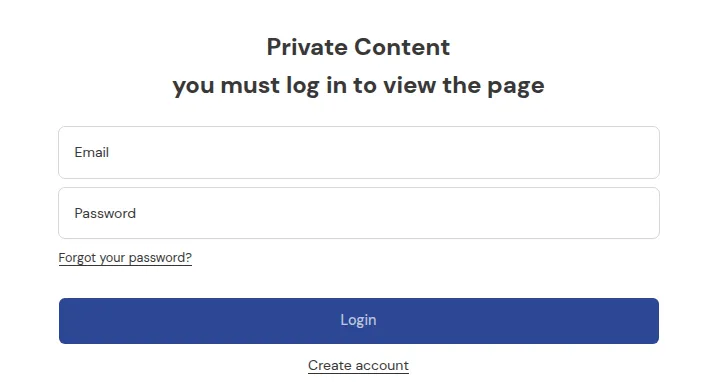
What your customers see on the storefront.
This FAQ is grouped into question clusters so you can quickly find the topic you care about.
1. Installation & setup
Section titled “1. Installation & setup”Q: Do I need a developer to install BSS B2B Lock?
A: Not necessarily. Most stores can install BSS B2B Lock, enable the App Embed, and create basic rules without any coding. For complex themes or custom layouts, a developer or the BSS Commerce support team can help.
Q: Why do I need to enable the App Embed?
A: The App Embed connects BSS B2B Lock’s logic to your theme templates. Without it, rules may be saved but won’t affect the storefront.
Q: Does BSS B2B Lock work on all themes?
A: BSS B2B Lock is designed to work with most Shopify Online Store 2.0 themes. Highly customized or older themes may require minor adjustments or manual integration.
2. Rules & behavior
Section titled “2. Rules & behavior”Q: What’s the difference between “Hide prices” and “Hide products/collections”?
A:
- Hide prices keeps products visible but removes their prices (and optionally “Add to cart”) for blocked visitors.
- Hide products/collections hides the items themselves, so they don’t show in grids, search, or collection pages for blocked visitors.
Q: Can I lock my entire website?
A: Yes. Choose Entire store under What do you want to lock? in Step 1 – Lock Target and define conditions in Step 2 – Access & Message (e.g., User type → Tagged customers with wholesale). Everyone else will see a lock screen.
Q: Can I combine multiple conditions in one rule?
A: Yes. You can use AND/OR logic in Step 2 – Access & Message to combine conditions:
- AND – add several conditions to the same Rule. A customer must meet every condition in the rule (the rule shows an AND pill and “2 conditions - all must match”). Example: “Tagged customers
wholesaleAND Passcode”. - OR – click + Add rule to create a separate Rule. A customer who meets any one rule gets access (an OR pill appears between rules). Example: “Rule 1: Tagged customers
distributorOR Rule 2: secret link”.
Each rule needs at least one condition: you can’t continue with an empty rule.
3. Customer accounts & login
Section titled “3. Customer accounts & login”Q: Does BSS B2B Lock manage passwords or login?
A: No. BSS B2B Lock relies on Shopify customer accounts. It checks whether a customer is logged in and what tags they have, but does not handle passwords or OTP codes itself.
Q: Will BSS B2B Lock work with Shopify’s New Customer Accounts (Email + OTP)?
A: Yes. BSS B2B Lock only checks is the customer logged in? and what are their tags?. Whether they logged in with a password or a one-time code doesn’t change how rules work.
Q: Can I still use a classic password login form instead of Email OTP?
A: Yes, with some limitations. BSS Commerce can help you set up a password-based login page via free support. See Keep Password Login Instead of Email OTP.
4. Tags & segmentation
Section titled “4. Tags & segmentation”Q: Do I have to use customer tags?
A: You don’t have to, but tags are the best way to build scalable B2B logic. You can also use login-only, passcode, or secret link rules, but tags make it much easier to maintain multiple segments (wholesale, distributors, VIPs, etc.).
Q: How do customers get tagged?
A: Tags can be:
- Added automatically by BSS B2B Solution when you approve registrations.
- Set by automation tools (Shopify Flow, integrations).
- Added manually in Shopify Admin under Customers.
Q: What if a customer has multiple tags?
A: That’s fine. BSS B2B Lock rules will evaluate all tags. Just keep your logic clear (e.g., specific tags for region or tier) and design rules accordingly.
5. SEO & Google
Section titled “5. SEO & Google”Q: What does “Hide price on Google” actually do?
A: It adjusts theme output and structured data so search engines are less likely to show your product prices in search results. It does not delete or unindex your pages.
Q: Will hiding prices hurt my SEO?
A: Hiding prices alone usually doesn’t hurt SEO as long as:
- Pages remain indexable.
- Titles, descriptions, and content are still meaningful.
You may lose price-based rich snippets, which is intentional for B2B privacy.
Q: Do I need to re-submit my sitemap after changing “Hide price on Google”?
A: Not strictly, but it can sometimes speed up re-crawling. The main factor is time – Google needs to revisit pages and update its cached data.
6. Theme & compatibility
Section titled “6. Theme & compatibility”Q: Will BSS B2B Lock work if I change themes?
A: Yes, but you need to:
- Re-enable the App Embed for the new theme.
- Test your locks again on the new layout.
If the new theme has a significantly different structure, support may need to adjust integration.
Q: Does BSS B2B Lock work with other B2B or pricing apps?
A: Generally yes, especially with other BSS B2B apps (BSS B2B Solution, Portal, BSS B2B Quote, etc.). For third-party apps, behavior depends on how they modify the theme. If in doubt, test or contact support.
Q: How do I remove BSS B2B Lock completely before uninstalling?
A: Go to Theme Cleanup in the app’s left navigation and click Disable all rules. This deactivates 100% of lock rules across all your themes and restores normal storefront access before you remove the app from Shopify. See Theme Cleanup (Disable All Rules Before Uninstall) for step-by-step instructions.
7. Checkout
Section titled “7. Checkout”Q: Do I need Shopify Plus for checkout restrictions?
A: No. Checkout Lock features that block or control checkout flow are available on all Shopify plans. Catalog-level locks (hiding prices/products/collections/pages) work on all plans.
Q: Can I block checkout for certain customers or products?
A: Yes. You can create rules that block checkout when:
- Customer is not tagged with an approved tag.
- Cart contains restricted products/collections.
- Shipping country or other conditions don’t meet your criteria.
8. Support & assistance
Section titled “8. Support & assistance”Q: How do I contact support?
A: You can use the in-app chat or email [email protected]. Include your store URL, theme name, and screenshots of any problematic rules or pages.
Q: Can you help me configure rules specific to my business?
A: Yes. The support team can:
- Review your use case.
- Suggest rule structures and tag strategies.
- Help set up or adjust locks for common B2B scenarios.