
CSV Upload (Bulk Import)
The CSV Upload (Bulk Import) feature empowers B2B buyers to upload spreadsheets containing product SKUs and quantities to quickly populate massive orders in seconds. It bridges the gap between buyers’ internal ERP/purchasing software and your Shopify store.
1. How the Bulk Import Flow Works
Section titled “1. How the Bulk Import Flow Works”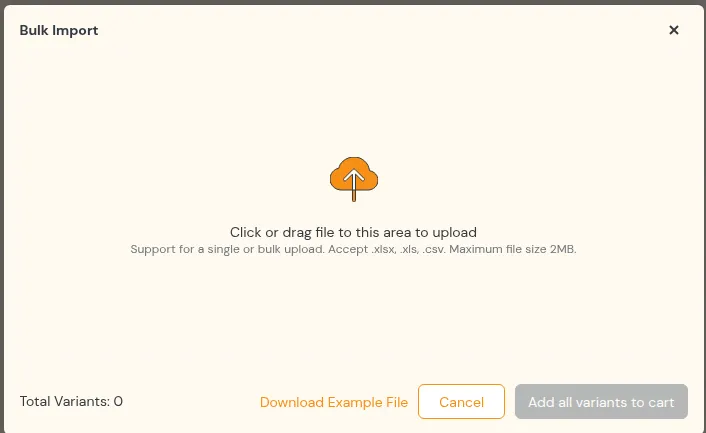
- Upload the file(s): Buyers drag and drop one or more spreadsheet files (
.xlsx,.xlsor.csv, up to 2 MB each) into the bulk import modal. - Batch Validation & Stock Lookup: The app verifies SKU validity and inventory levels in real time.
- Interactive Results Table: Displays verified active products with images, titles, SKUs, prices, and editable quantity fields.
- Add to Cart: Buyers review the verified list and click Add to Cart to push all items directly to checkout.
2. Interactive Product Results Summary
Section titled “2. Interactive Product Results Summary”Instead of silently dumping products into the cart, the system displays a clear Results Summary Table:
Key Summary Features:
Section titled “Key Summary Features:”- Product Rows: Each row displays the product thumbnail, title, brand, SKU, real-time unit price, and an editable quantity input box ($\ge 1$).
- Total Variants Counter: Displays the consolidated variant count cleanly in the footer.
- Multi-File Merging: If a buyer uploads multiple CSV files containing duplicate SKUs, quantities are automatically summed together.
- Smart Inventory Handling: If a product has out-of-stock variants, only the out-of-stock variants are excluded while all in-stock variants are preserved.
- Invalid SKU Banner: Any unrecognised or discontinued SKUs are isolated and listed in an informative warning banner without failing the rest of the import.
3. Required CSV Format
Section titled “3. Required CSV Format”To ensure seamless importing, uploaded files must adhere to standard CSV formatting:
3.1 File Rules
Section titled “3.1 File Rules”- File type:
.xlsx,.xlsor.csv, maximum 2 MB per file. For CSV, use UTF-8 encoding. - Headers: one column for the SKU and one for the quantity. Headers are not case-sensitive, and common names are recognised:
- SKU column:
sku,variant sku,sku code,product sku,variant code,item sku,item code - Quantity column:
quantity,qty,amount,order qty,order quantity,qty ordered,quantity ordered
- SKU column:
3.2 Sample CSV Structure
Section titled “3.2 Sample CSV Structure”sku,quantityTSHIRT-BLK-S,50TSHIRT-BLK-M,100TSHIRT-BLK-L,75HOODIE-GRY-XL,204. Common Business Scenarios
Section titled “4. Common Business Scenarios”| Scenario | Business Outcome |
|---|---|
| Weekly Warehouse Restock | A retailer exports 200 low-stock SKUs from their POS system and uploads the file directly to Quick Order. |
| Sales Rep Field Orders | Sales representatives maintain client Excel order sheets and upload them on the road in 1 click. |
| Purchase Order Re-ordering | Corporate buyers import purchase order spreadsheets directly to populate their cart for streamlined invoicing. |