
Quote insights and lost reasons
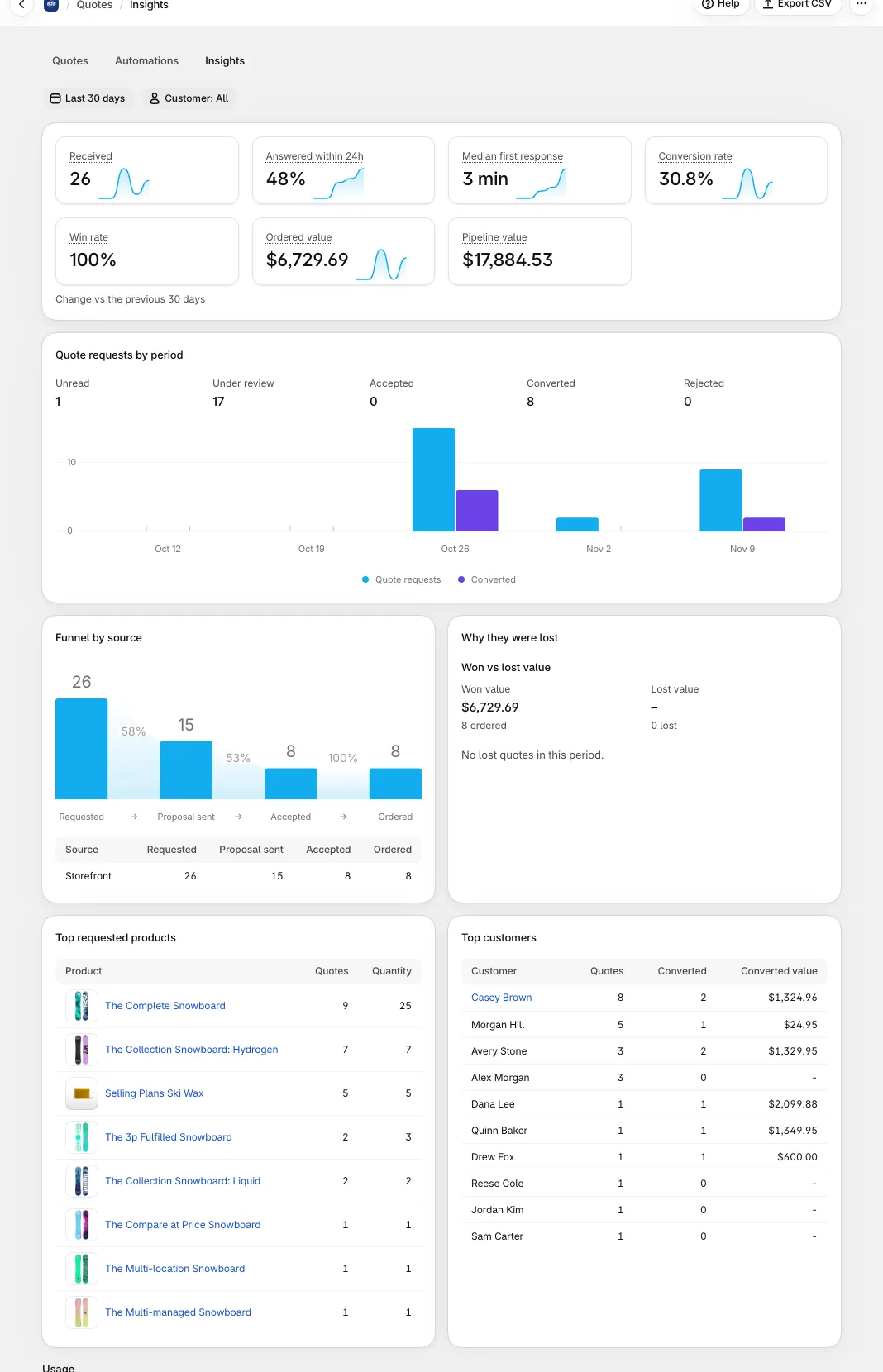
Quotes > Insights shows how your quote business is doing for a period you choose, compared with the period right before it. Use it to answer three questions: how fast do we reply, how many quotes become orders, and why do we lose the rest.
To open it, click Quotes in the app menu and then the Insights tab, or click View insights on Home.
1. Choose the period and the customer
Section titled “1. Choose the period and the customer”- Date range: pick a preset (Last 7, 14, 30 or 90 days, This week, Last week, This month, Last month, This quarter, Last quarter, This year, Last year) or a custom range. The default is Last 30 days. Presets follow your shop’s time zone.
- Customer: All, B2B (the quote has a company) or B2C (no company). The filter is kept in the page address, so you can bookmark or share a filtered view.
- Export CSV downloads the numbers on the page for the range and filter you chose.
Every number is compared with the previous period of the same length, so you can see whether it went up or down.
2. The tiles
Section titled “2. The tiles”| Tile | What it counts |
|---|---|
| Received | Quotes your buyers sent. Quotes you create in the admin are not counted; the page names how many were created by staff. Test quotes from the storefront preview are left out of every number. |
| Answered within 24h | The share of quotes you answered for the first time within 24 hours. |
| Median first response | The median time from the quote request to your first reply. It is based on the quotes with a recorded first reply, and the page shows how many. |
| Conversion rate | Orders from quotes buyers sent, as a share of those quotes. |
| Ordered value | The total value of orders placed from quotes, by currency. |
| Win rate | Orders as a share of quotes with an outcome. A quote open for more than 30 days counts as lost. This differs from Conversion rate, which counts orders against all quotes buyers sent. |
| Pipeline value | Open quotes from the last 30 days plus accepted quotes not yet ordered, by currency. Quotes without a value are not counted. |
Each tile has a small trend chart for the period. The chart groups by day up to 14 days, by week up to 90 days and by month beyond that.
3. Funnel by source
Section titled “3. Funnel by source”Funnel by source shows a funnel chart and a table. Quotes are followed through four steps: Requested, Proposal sent, Accepted and Ordered. The table has one row per source (for example the storefront quote form or Quick Order), so you can see which source brings quotes that turn into orders.
4. Why they were lost
Section titled “4. Why they were lost”Why they were lost lists the lost quotes of the period by Reason, with the Share of each. The summary line reads, for example, “12 lost quotes: 9 marked lost, 3 expired”. Quotes that expired without a decision are shown on their own line, Expired without a decision. If nothing was lost in the period, the card says so.
Top requested products and top customers
Section titled “Top requested products and top customers”On the Business plan or higher, Top requested products lists the products that appear in the most quotes, with the number of quotes and the quantity. Top customers lists the buyers who sent the most quotes, with how many converted and their converted value.
5. Lost reasons
Section titled “5. Lost reasons”When a quote is closed without an order, the app keeps a standard Lost reason. These are the reasons:
| Reason | Meaning |
|---|---|
| Price | The price was too high. |
| Lead time | The lead time was too long. |
| Chose another supplier | The buyer is going with someone else. |
| No longer needed | The buyer does not need the products any more. |
| Other | Anything else. Add a note to explain. |
You close a quote as lost. Move one quote, or several selected in the list with Change stage, to Lost. The Lost reason window opens. Both fields are optional:
- Pick a Reason.
- Add a Note (up to 2,000 characters) for your team.
- Confirm.
A buyer declines. In the New look (see Buyer account), the Decline window asks Why are you declining? with the same reasons, and an optional comment. With the Classic look, the buyer can still type a reason, but it has no standard reason.
A quote closed without a reason, or closed before reasons existed, shows as Not specified. The quote page shows the reason and note under Why it was lost, and the Activity timeline records them.
6. When the page is empty
Section titled “6. When the page is empty”If there are no quote requests in the period, Insights says No quote requests in this period. Pick a longer period, or check that your quote form is live with Review quote form. If quotes exist but none match your filters, change the date range or the Customer filter.
Related pages
Section titled “Related pages”- Quote statuses and lifecycle
- View and edit a quote
- Messages and counter-offers
- Help Center: guides for this page are also in the app, under the ? button.