Invoice PDF FAQ: Tax Invoices, Language, Limits, Data
Invoice PDF creates an order summary, not a tax invoice. This FAQ answers the questions merchants ask most about which orders get a PDF, language, currency, limits and what happens to your data. For price and setup, start with the Invoice PDF overview.
Key takeaways
Section titled “Key takeaways”- The PDF is an order summary numbered with the Shopify order number, not a tax invoice.
- Net Terms orders get one while the switch is on. Other orders follow your choice: B2B buyers only, all buyers or none.
- Past orders do not get a PDF automatically.
- The PDF and the email use English labels. Your own text prints as you typed it.
- Ending the add-on deletes nothing. PDFs and your logo are deleted 30 days after you uninstall.
Limits at a glance
Section titled “Limits at a glance”| What | Limit | Where it applies |
|---|---|---|
| Logo file | PNG or JPG, 1 MB, 2000 px on a side, 4,000,000 pixels | PDF design, Brand |
| Header note | 120 characters, one line | PDF design, Header and footer |
| Footer text | 6 lines, 100 characters per line, 500 in all | PDF design, Header and footer |
| Label | 40 characters each, 12 labels | PDF design, Labels |
| File name | 80 characters | PDF design, File name |
| Download link | Works for 5 minutes | Order summaries list |
| Sending the same PDF again | Wait 1 minute after a successful send | Order summaries list |
| Free trial | 14 days. You can use the free trial once for each add-on on a store. A free use on a development store does not count | Pricing plans > Add-ons |
Is an order summary a tax invoice?
Section titled “Is an order summary a tax invoice?”No. It is a PDF copy of the order, numbered with the Shopify order number rather than with a number from your accounting system. If you need a tax invoice, use an invoicing app such as Sufio. Order Printer Pro prints documents with your B2B prices. Turn on Share B2B details with invoice apps to add the company, Tax ID and PO number to new orders as order attributes. See Invoice PDF order summaries.
Which orders get a PDF, and which do not?
Section titled “Which orders get a PDF, and which do not?”Net Terms orders always get one while Create order summaries is on, when the Net Terms order is created. Other orders get one when Shopify reports them paid, and only if they match your choice under Create summaries for: B2B buyers only (orders placed for a company), All buyers or No other orders. Cancelled and voided paid orders are skipped. A Net Terms order does not get a second summary when it is later paid. Nothing is created while Create order summaries is off.
Will Invoice PDF create PDFs for my past orders?
Section titled “Will Invoice PDF create PDFs for my past orders?”No. Only orders created (Net Terms) or paid (other orders) after the add-on is active and the switch is on get a PDF.
Can the PDF use the numbering of my accounting system?
Section titled “Can the PDF use the numbering of my accounting system?”No. Each PDF is numbered with the Shopify order number, for example #1001. You can rename the labels, but not the number.
What language are the PDF and the email in?
Section titled “What language are the PDF and the email in?”The PDF labels and the email are in English. You can rename the 12 labels in the PDF design, and the text you type prints as you typed it. Latin, Greek, Cyrillic and Vietnamese text prints correctly. Chinese, Japanese and Korean text prints from an included font subset, so a rare character outside it can show as an empty box. Other scripts, such as Thai or Arabic, are replaced by the text “[text not shown]”, and a short note at the end of the PDF explains it.
Which currency and paper size does the PDF use?
Section titled “Which currency and paper size does the PDF use?”The PDF shows the currency the buyer paid in. Paper size follows your store country: Letter in the United States, Canada, Mexico and some other countries, A4 elsewhere. The A4 or Letter switch in the editor changes the preview only.
Does the PDF change when an order changes?
Section titled “Does the PDF change when an order changes?”No. A summary is a snapshot of the order when it was created. Later refunds, edits and payments do not change it. Open the row menu and click Create new version to read the order again. The older version is kept.
Who receives the email, and which sender is used?
Section titled “Who receives the email, and which sender is used?”The email goes to the address on the Shopify order, read when you send. If the order has no address, the row shows No email on the order. The sender is the From address you set in Settings > Email settings. If you have not set one, the default BSS B2B Solution sender is used. See Email Sender. If an email shows Not delivered, click Try sending again.
What happens if I remove the add-on or the trial ends?
Section titled “What happens if I remove the add-on or the trial ends?”New summaries and new emails stop. Nothing is deleted, and your summaries stay in the list where you can still download them. Send to buyer, Resend to buyer, Try again and Create new version need the add-on, and the Settings tab shows a banner only. Adding Invoice PDF again starts new summaries, and you can retry failed ones then.
How long are my PDFs kept?
Section titled “How long are my PDFs kept?”PDFs and your logo are deleted 30 days after you uninstall BSS B2B Solution. When Shopify asks to erase a customer, the PDF of that order is removed and its row shows Removed, with the note “The order data was removed, so there is no PDF.” Ending the add-on deletes nothing.
Can I try Invoice PDF on a development store?
Section titled “Can I try Invoice PDF on a development store?”Yes, if the store has the Development plan. Click Turn on for free on the Invoice PDF card. Shopify records a test charge and nobody is billed. It ends when the store moves to a paid Shopify plan, and you can add it again on the live plan. You can use the free trial once for each add-on on a store. A free use on a development store does not count, so the 14-day trial is still available on the live plan.
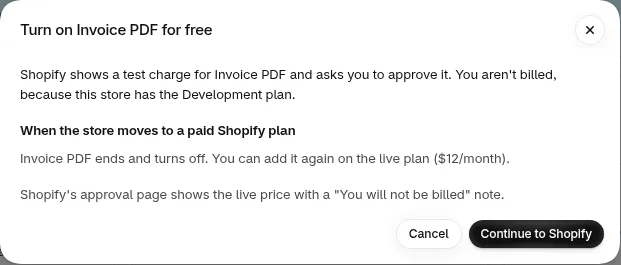
The dialog on a development store.
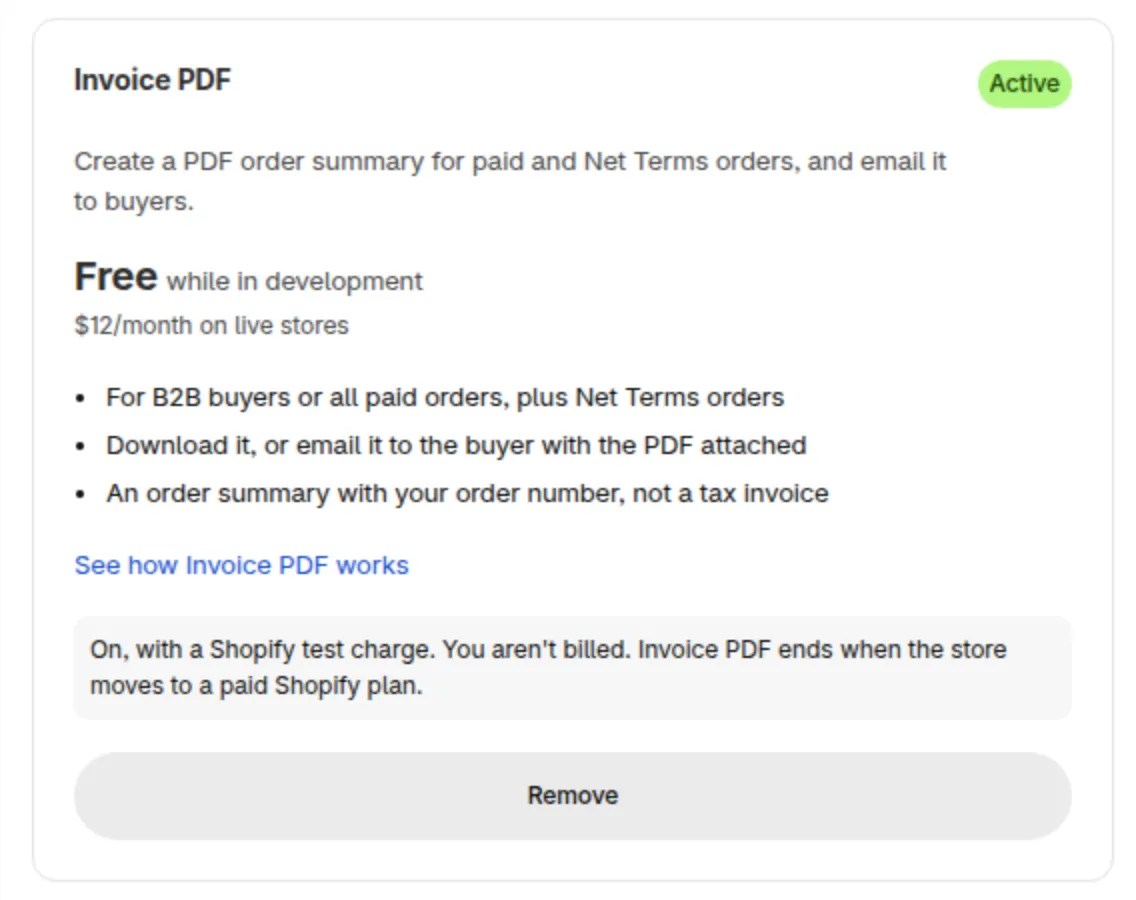
The card after you turn it on.
Can I print a different logo for each customer?
Section titled “Can I print a different logo for each customer?”No. Each store has one design that applies to all summaries.
Ready to try it? Start the free trial from Pricing plans > Add-ons. See the Invoice PDF overview.