Discount Code
The Discount Code module allows your customers to apply discount codes directly on their B2B orders, giving them the same familiar shopping experience they get from a retail store, while keeping full control over how discounts are applied in a wholesale environment.
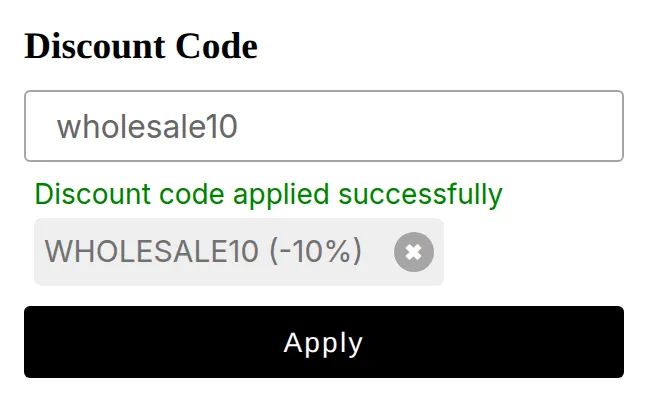
What your customers see on the storefront.
This module is the discount-code system built into BSS B2B Solution, not Shopify’s. You create the codes inside the app, and the app renders a discount-code box on your cart page where B2B buyers enter them. The discount is calculated in the cart before checkout begins.
This feature is perfect for running promotions, loyalty rewards, or seasonal campaigns tailored to your wholesale buyers.
What You Can Do with the Discount Code Module
Section titled “What You Can Do with the Discount Code Module”- Enable or disable discount code usage on wholesale orders.
- Create discount codes inside the app, scoped to your B2B buyers.
- Restrict discounts based on products, collections, customer groups, or order value.
- Offer flexible deals like percentage off, fixed amount off, or free shipping.
- Combine with other B2B pricing rules for complete control over order value.
Why It’s Useful
Section titled “Why It’s Useful”- Enhance customer experience: Let B2B customers enjoy promotions effortlessly.
- Run wholesale campaigns: Create targeted offers to boost loyalty and order frequency.
- Maintain pricing integrity: Manage which discounts apply to specific B2B buyers or groups.
- Encourage larger purchases: Incentivize higher order values through strategic discounts.
The Discount Code module makes it easy to combine wholesale flexibility with promotional power, giving you a simple yet effective way to reward your B2B customers and grow long-term relationships.
Using this alongside Shopify’s native discounts
Section titled “Using this alongside Shopify’s native discounts”You can keep using Shopify’s own discount codes at the same time, but there are two behaviours to plan for.
Native Shopify discounts apply to everyone by default
Section titled “Native Shopify discounts apply to everyone by default”A discount code created in Shopify Admin is not aware of your B2B setup. Unless you deliberately limit it, using Shopify’s own customer segments, or by making it a one-time code, it is available to every shopper who knows the code, retail and wholesale alike. That means a code you intended for a retail campaign can also be redeemed by a wholesale buyer who is already receiving negotiated B2B prices, discounting the same order twice.
If you run native Shopify campaigns while B2B pricing is live, restrict them to the right audience in Shopify Admin (customer segment or specific-customer eligibility) rather than assuming B2B buyers are excluded.
Not every native discount type works with B2B pricing
Section titled “Not every native discount type works with B2B pricing”BSS B2B Solution builds its own checkout to carry your B2B prices through to the order. Shopify’s native discounts are evaluated by Shopify in that same checkout, and the two do not combine reliably for every discount type: some code types may not apply, may apply on top of the B2B price, or may be dropped, depending on the discount and the pricing modules in play. Shopify automatic discounts come off the price after the B2B discount. On versions 1 and 3 and on version 5 draft-order checkout, that happens only when you allow them. On version 5 with Shopify checkout, they combine with B2B prices by default.
Two controls matter here:
- Settings > Shopify checkout settings decides whether native Shopify discount codes are accepted at all in the B2B checkout the app creates. On checkout versions 1 and 3, turn on Discount codes in the Shopify discounts card. On version 5, turn on Shopify discount codes. Both are off by default. See Shopify discounts.
- Automatic discounts follow a second setting in Settings > Shopify checkout settings: Automatic discounts in the Shopify discounts card on versions 1 and 3 (it stays Off until you choose another option), or Apply automatic discounts to draft orders on version 5 draft-order checkout. On version 5 with Shopify checkout there is no switch: choose Use whichever saves more to stop automatic discounts stacking with B2B prices. Volume Pricing applies its prices in the cart, and the automatic discount is then calculated at checkout on the price after Volume Pricing. See Run Seasonal Promotions on Top of B2B Prices.