
Net terms
The Net Terms module allows you to offer flexible payment options for your B2B customers, giving them the ability to place orders now and pay later within a specific time frame.
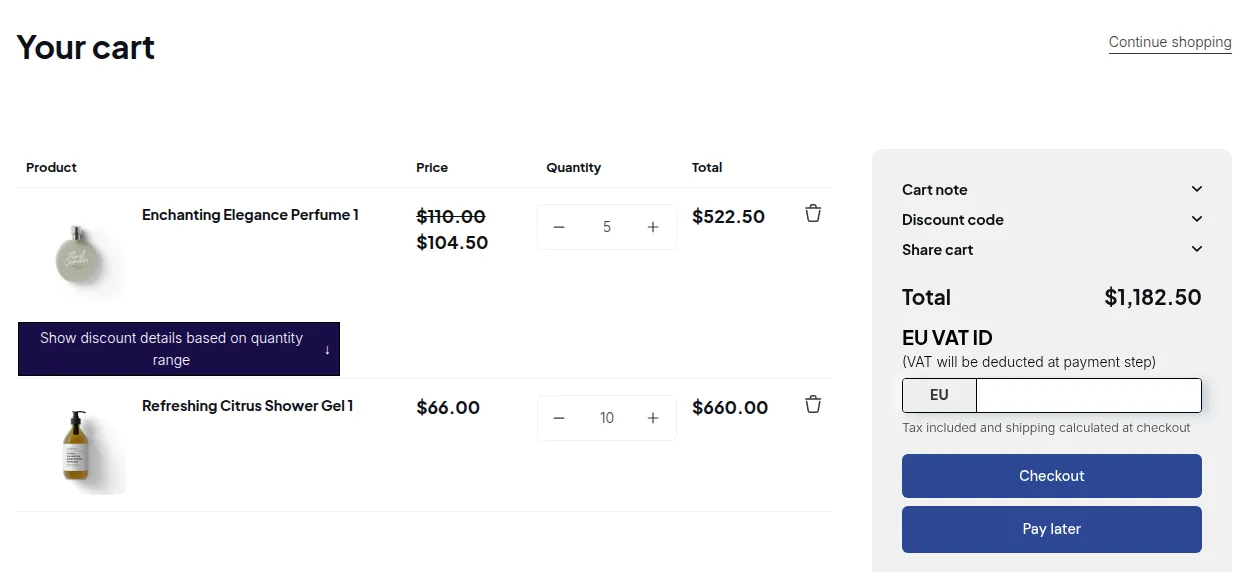
What your customers see on the storefront.
Instead of requiring immediate payment at checkout, you can assign payment terms such as Net 7, Net 15, Net 30, or any custom duration you prefer. This means the customer must complete their payment within the set number of days after placing the order.
This feature is essential for wholesale and enterprise-level businesses, where large or recurring orders often rely on deferred payments to simplify accounting and cash flow.
With the Net Terms module, you can:
- Create and manage multiple payment terms.
- Assign different terms to specific customers or customer groups.
- Let approved buyers complete checkout without paying immediately.
- Track and manage unpaid orders with due dates clearly displayed.
- Let buyers pick up their order at your Shopify locations. See Net Terms Local Pickup.
- Cap how much each customer can owe with the optional Credit limit add-on. See Credit Limit: Set Spending Limits for Net Terms Customers.
- Give each Net Terms order a PDF order summary with the optional Invoice PDF add-on. See Invoice PDF Add-on: Order Summary PDFs, Price, Free Trial.
Questions before you start? See the Net Terms FAQ.
By using Net Terms, you can strengthen customer relationships, improve operational flexibility, and create a more professional buying experience, perfectly aligned with how real-world B2B commerce operates.