
Quantity Increments
Quantity Increments restricts how customers purchase your products: they can only buy in specific multiples (packs, cases, or sets).
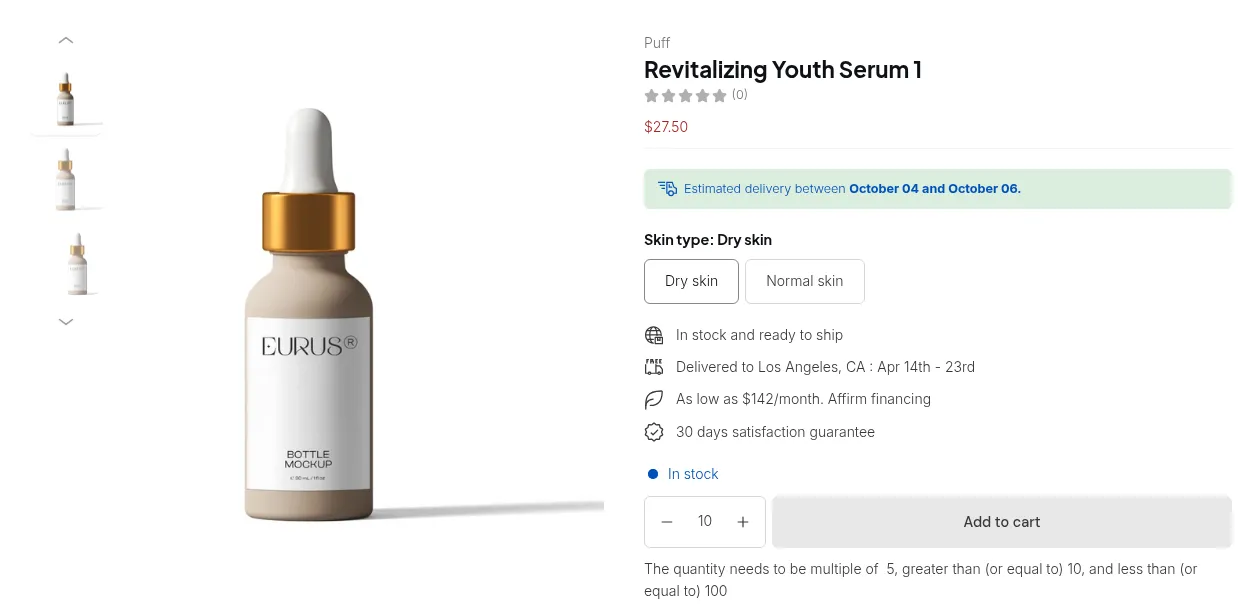
What your customers see on the storefront.
The Quantity Increments module is designed to give store owners full control over how customers purchase products by defining specific quantity steps. Instead of letting buyers enter any number, you can make products purchasable only in fixed multiples, for example, 5, 10, 15, and so on.
This feature is ideal for wholesale and B2B businesses, where products are often sold in cases, packs, or bundles. By using quantity increments, you can ensure all orders align with your packaging standards, simplify inventory management, and create a smoother buying experience for your customers.
What It Does
Section titled “What It Does”- Force purchases in defined multiples (e.g., only 5, 10, 15… never 7 or 12)
- Automatically adjust the quantity selector in increments
- Show validation messages when customers enter invalid quantities
- Apply to specific products, collections, or all products
- Naturally encourage bulk buying and higher order values
Common Use Cases
Section titled “Common Use Cases”| Use Case | Increment Value |
|---|---|
| Bottled beverages sold as 6-packs | 6 |
| Apparel sold in dozen units | 12 |
| Industrial supplies in boxes of 24 | 24 |
| Minimum case size of 50 | 50 |
Combining with Order Limits
Section titled “Combining with Order Limits”Quantity Increments and Order Limits work together to give you complete purchase control:
- Order Limits sets the minimum/maximum
- Quantity Increments controls the step size between those limits
Example: Minimum 5 units, increments of 10 → valid quantities: 10, 20, 30…