
Sales Rep Commission: Rates, Monthly Lock and Mark as Paid
Sales Reps works out commission for each rep from the orders the rep placed. You set a rate for each rep. The Commission tab shows the amounts by month, and you mark each month as paid after it locks. Sales Reps does not pay your reps. Marking a month as paid only records that you did.
Key takeaways
Section titled “Key takeaways”- The commission rate is set per rep, from 0 to 100 percent. The default is 0, which means no commission.
- Commission is based on product lines. Shipping and order-level refunds do not change commission.
- Commission is counted when the order is paid.
- A month is Open until the 1st of the next month at 00:00 store time. Then it is Locked.
- You can mark commission as paid only for a locked month.
- After the add-on ends, commission records stay available for 90 days.
How do I set a commission rate?
Section titled “How do I set a commission rate?”Go to B2B orders & discounts > Sales Reps > Reps and click the rep. Enter the Commission rate in the Commission box on the rep’s page. The rate is not in the Settings tab. Use a number from 0 to 100, with up to 2 decimals. A new rate applies only to orders paid from now on. Orders already paid keep the rate they had when they were paid.
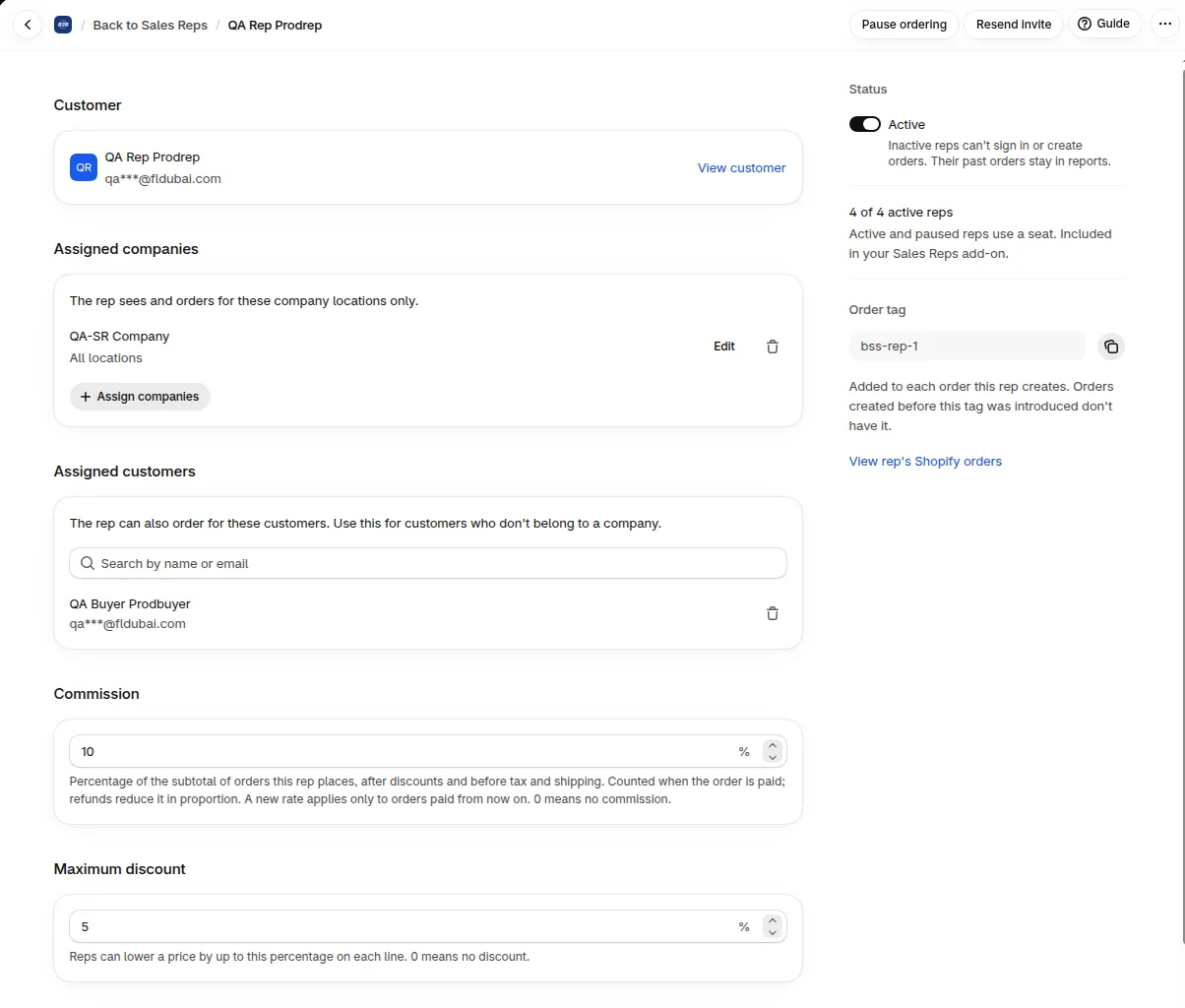
The Commission box on the rep’s page holds the rate.
How is commission worked out?
Section titled “How is commission worked out?”Commission = the rep’s rate on the day the order is paid, applied to the order subtotal after discounts, without tax and shipping. It starts when the order is paid, not when the rep creates the draft.
When items on a paid order are refunded, commission is reduced in proportion. Only refunded items reduce it. Refunds without items, such as shipping or goodwill amounts, don’t.
Example: a rep has a 5% rate. A rep’s order has a subtotal of $1,000.00 after discounts, plus $50.00 shipping and $80.00 tax. Commission is 5% of $1,000.00, which is $50.00. Later one line worth $200.00 is refunded, so commission falls by $10.00 to $40.00. A separate $30.00 shipping refund changes nothing.
If you edit a draft before it is paid, commission uses the subtotal at the time the order is paid.
How do I read the Commission tab?
Section titled “How do I read the Commission tab?”Open B2B orders & discounts > Sales Reps > Commission and choose a Month.
| Column | What it shows |
|---|---|
| Rep | The rep |
| Paid orders | Orders paid in the month |
| Subtotal | The order subtotal used as the base |
| Earned | Commission earned |
| Refunds | Commission taken back for refunded items |
| Net commission | Earned minus refunds |
| Payout | Mark as paid, or Paid with the date |
A rep who was paid in two currencies has one row for each currency. Export CSV downloads the table.
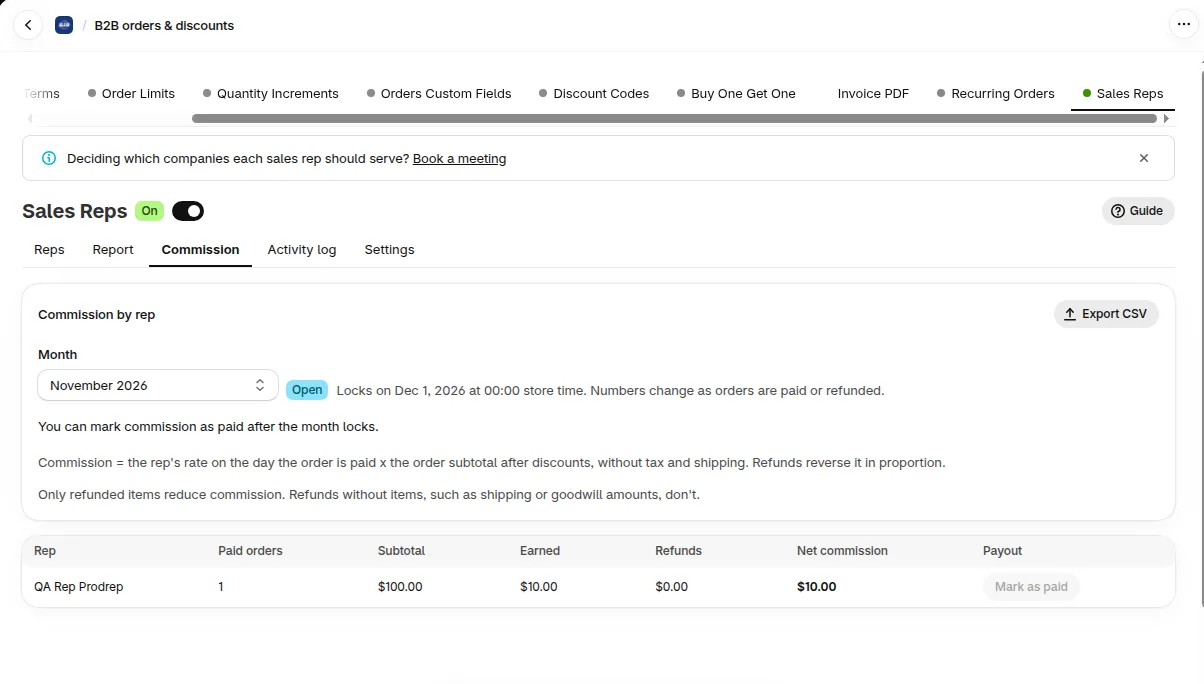
An Open month shows the date it locks, and Mark as paid stays off.
What do Open and Locked mean?
Section titled “What do Open and Locked mean?”An Open month still changes as orders are paid or refunded. The tab shows when it locks: “Locks on” the date “at” the time “store time”. A Locked month does not change. A refund that arrives after the lock counts in the month when the refund happens.
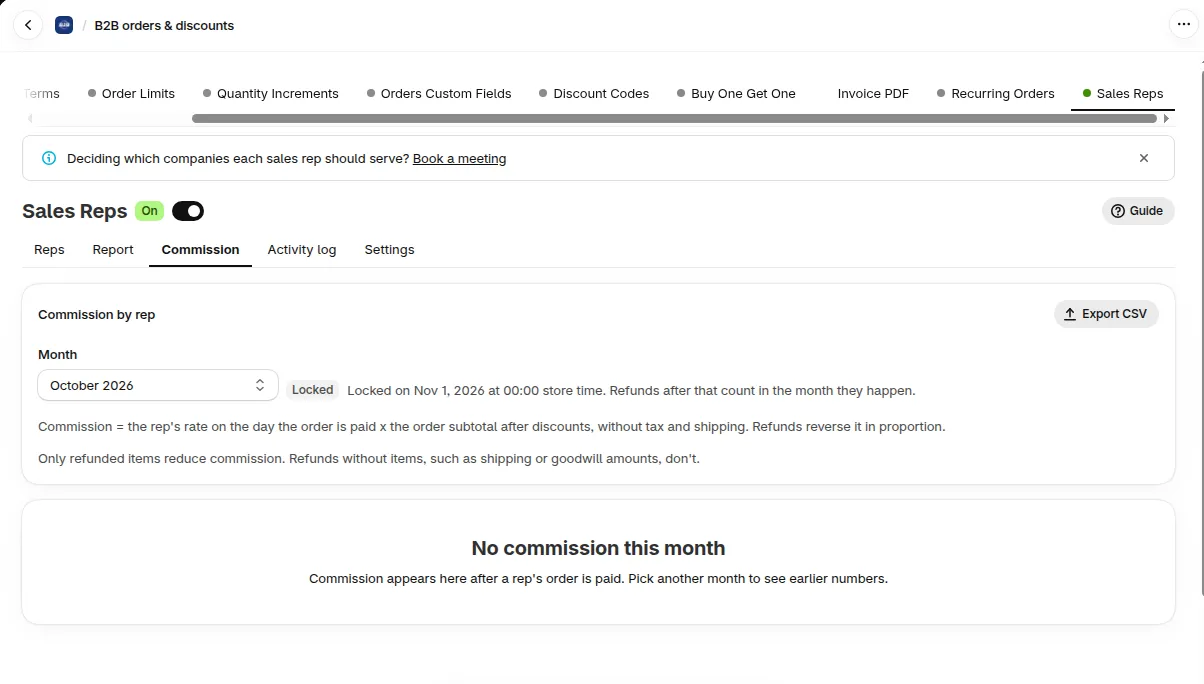
A Locked month shows the lock date. This one has no paid orders.
How do I mark commission as paid?
Section titled “How do I mark commission as paid?”-
Choose a locked month
Section titled “Choose a locked month”In Month, pick a month with the Locked badge. In an open month the button is off, and the tab says You can mark commission as paid after the month locks.
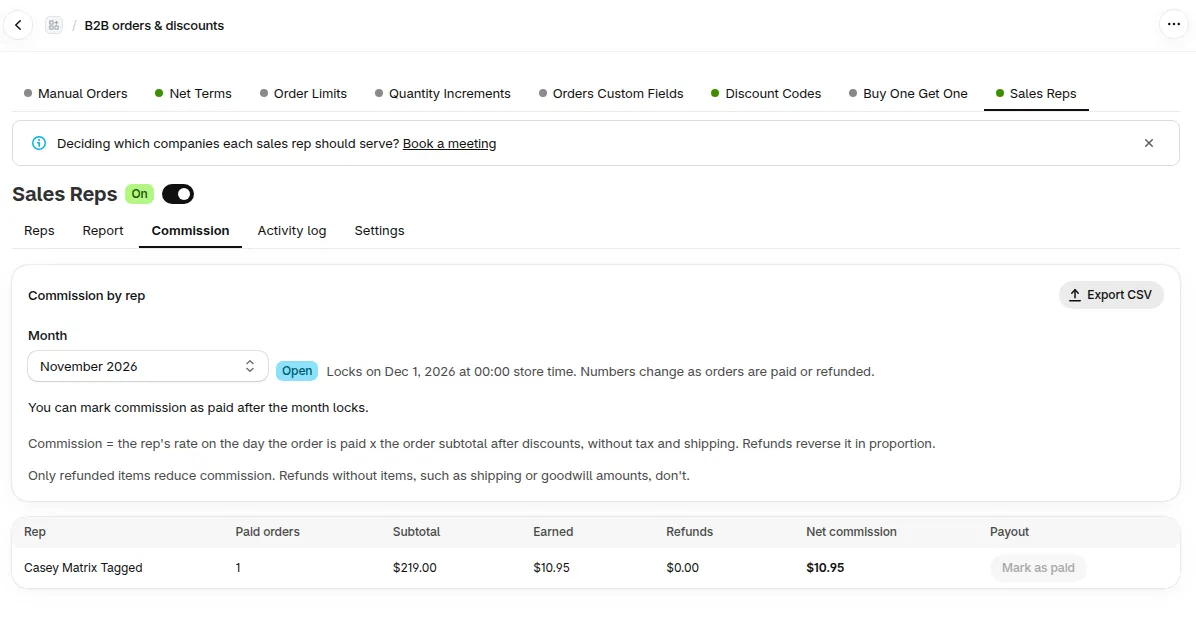
In an open month the Mark as paid button in the Payout column is off.
-
Click Mark as paid
Section titled “Click Mark as paid”Click Mark as paid in the row of the rep. The toast Marked as paid shows, and the row shows Paid with the date. If the rep has more than one currency, one click marks all of them.
-
Undo it if you clicked by mistake
Section titled “Undo it if you clicked by mistake”Click Mark as unpaid and confirm. The paid date is removed.
The Activity log records Marked commission as paid and Unmarked commission as paid.
What happens to commission when the add-on ends?
Section titled “What happens to commission when the add-on ends?”Your commission records are kept. For 90 days from the day the add-on ends, you can still view the Commission tab, export it and mark commission as paid. The banner says: Sales Reps add-on ended. Commission records stay available until the date.
| Time | What happens |
|---|---|
| The day the add-on ends | Reps lose portal access. Reps, assignments, orders and commission records are kept |
| For 90 days | You can view, export and mark commission as paid. Refunds of earlier orders still reduce commission, in the month when the refund happens. New orders paid after the end earn no commission |
| Buy again within 90 days | Your old records continue as before |
| After 90 days | The commission pages are no longer available. Export first |
Does commission include shipping or tax?
Section titled “Does commission include shipping or tax?”No. It uses the order subtotal after discounts, without tax and shipping.
Does a shipping refund lower commission?
Section titled “Does a shipping refund lower commission?”No. Commission is based on product lines. Shipping and order-level refunds do not change commission.
Why is my revenue in Report different from my commission base?
Section titled “Why is my revenue in Report different from my commission base?”Revenue in the Report tab is the order total after refunds, with tax and shipping. Commission uses product lines only. See settings and reports.
When does a month lock?
Section titled “When does a month lock?”At 00:00 on the 1st of the next month, in your store’s time zone.
Can I change the rate for an order that is already paid?
Section titled “Can I change the rate for an order that is already paid?”No. A new rate applies only to orders paid after you change it.
Why does Commission earned in My orders not match Sales?
Section titled “Why does Commission earned in My orders not match Sales?”They differ because they count different dates. Sales counts an order on the day it was placed, and Commission counts it on the day the customer paid, so an order that is paid next month shows in next month’s Commission. The Commission earned card shows what was earned in the month, before refunds. The Commission tab shows the amount after refunds. See the My orders cards.