
Multi-Currency
The Multi-Currency module allows you to display and manage product prices in multiple currencies across your B2B/Wholesale store. This is an essential feature for businesses serving customers in different countries or regions, helping you deliver a localized, professional, and seamless shopping experience.
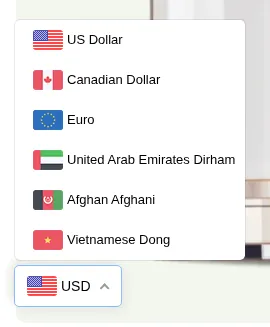
What your customers see on the storefront.
With this module, your international buyers can view product prices in their preferred or assigned currency, making it easier for them to understand pricing, compare values, and make confident purchasing decisions.
What You Can Do with the Multi-Currency Module
Section titled “What You Can Do with the Multi-Currency Module”- ✅ Display prices in different currencies based on customer location or selection.
- ✅ Automatic currency conversion using Shopify’s exchange rates.
- ✅ Provide currency switchers so customers can choose their desired display currency.
- ✅ Display consistent local pricing across product pages and carts. At checkout, customers pay in your store’s default currency (or the currency set by Shopify Markets, if enabled), the Multi-Currency display does not change the checkout currency.
Why It’s Useful
Section titled “Why It’s Useful”- 🌐 Expand globally: Make your store accessible to customers in multiple countries.
- 💬 Increase transparency: Help buyers understand pricing without currency confusion.
- 💰 Boost conversion rates: Customers are more likely to complete a purchase when prices appear in their local currency.
- 🧾 Simplify management: Control exchange rates and display rules easily from one dashboard.