
Recurring Orders Add-on: Repeat B2B Orders on a Schedule
The Recurring Orders add-on for BSS B2B Solution creates the same order for one B2B buyer on a schedule, every 1 to 12 weeks or months. Each order is priced with the B2B prices that apply to that buyer on that day. You review each one as a draft, or let it go out on its own.
Key takeaways
Section titled “Key takeaways”- Each schedule has one buyer, a list of products and quantities, how often, and a first date.
- On each date at about 6:00 AM store time, BSS B2B Solution creates a Shopify draft order for that buyer.
- Prices are worked out again on every date. A change to your pricing rules applies to the next order.
- Review is the default. It creates the draft and you send it or create the order in Shopify.
- Auto creates the order with the location’s payment terms, or emails a Shopify invoice to a customer without a company.
- Nothing is charged to a saved card. Buyers pay through payment terms or the Shopify invoice.
- Recurring Orders works on your current storefront, version 3 or version 5.
How does Recurring Orders work?
Section titled “How does Recurring Orders work?”You create a schedule once. After that, the app does the repeat work:
- On each order date, at about 6:00 AM store time, the app creates a draft order with the schedule’s products and quantities.
- The prices come from your B2B pricing rules for that buyer, as they are on that day.
- In Review, the draft waits for you. In Auto, the order or the invoice goes out without your review.
- The result is added to the schedule’s Run history.
Start with Review. Switch a schedule to Auto after a few orders look right.
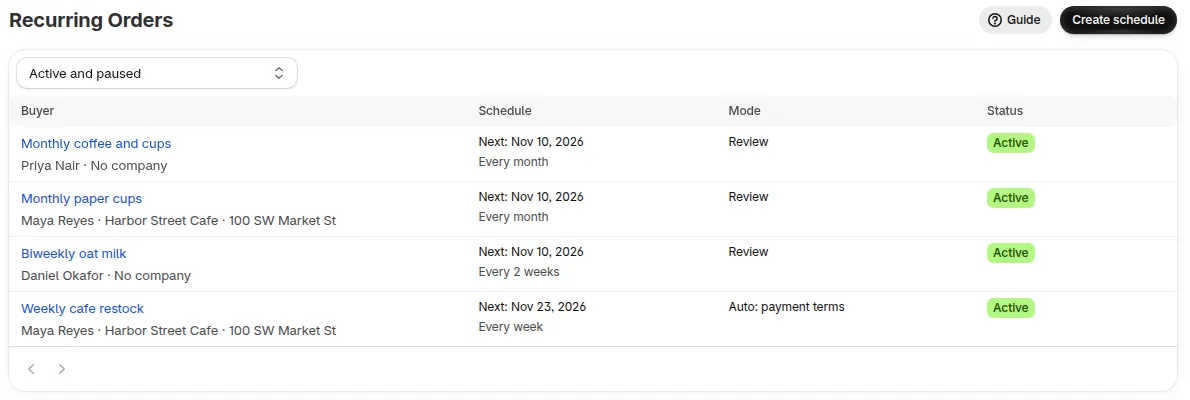
The Recurring Orders tab lists every schedule with its buyer, mode and status.
What do I need first?
Section titled “What do I need first?”- The Recurring Orders add-on. See Add Recurring Orders.
- A paid plan. Recurring Orders works on your current storefront, version 3 or version 5.
- For Auto with a company, payment terms on the company location. See Net Terms.
What is in this guide?
Section titled “What is in this guide?”- Add Recurring Orders and create a schedule
- Review or Auto
- Pause, resume and delete a schedule
- Let buyers manage a schedule in the B2B Portal
- Read the run history
- FAQ and limits
Limits to know
Section titled “Limits to know”- Saved cards are not charged automatically yet. Orders are drafts, Net Terms orders or Shopify invoices, depending on the mode.
- Each schedule has one buyer. You cannot change the buyer or the company location after you save.
- When the add-on ends, schedules pause automatically, at the latest on their next order date. See Pause, resume and delete.
All limits are on the FAQ and limits page.
Need help with Recurring Orders? Reach us at [email protected] or Live Chat.