
Manual Order Credit Limit Warning and Admin-Created Orders
The manual order credit limit warning appears when you create a Manual Order with Payment due later ticked and the buyer is close to, or over, their credit limit. It only warns. You can always create the order.
Key takeaways
Section titled “Key takeaways”- The warning shows on a Manual Order when Payment due later is ticked, payment terms are chosen and a customer is selected.
- It never blocks the order and never changes the buyer’s balance by itself.
- A Manual Order with payment terms counts toward the buyer’s balance shortly after Shopify reports it.
- Credit limit counts orders placed through BSS B2B Solution. Orders created directly in Shopify admin or at POS count only when they carry payment terms and a company buyer, and a company or location rule applies.
- Add a balance by hand with Opening balance or Adjust on the customer’s credit page.
What does the manual order credit limit warning say?
Section titled “What does the manual order credit limit warning say?”The warning is a banner in the payment section of the Manual Order page, under Payment due later. It names the buyer, shows Limit, Used and Available, and has a View credit details button that opens the buyer’s credit page.
Used is what the buyer owes plus pending Pay later drafts. Available is the limit minus Used.
| State | When it shows | Banner heading |
|---|---|---|
| Would exceed | The order total is more than the buyer’s available credit | This order would put {name} over their credit limit |
| Already over | Used is already above the limit | {name} is already over their credit limit |
| On hold | You placed the buyer on hold for Pay later | {name} is on hold for Pay later |
| Overdue | The buyer has an overdue order and the overdue block is on | {name} has an overdue order |
| Within limit | The order fits in the available credit | No banner |
Each banner says “You can still create this order.”
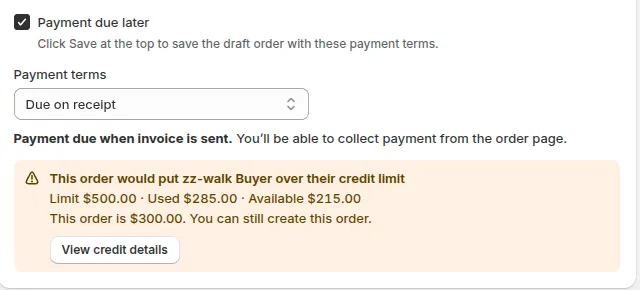
The banner shows the limit, what is used and what is available for the selected buyer.
Example: a buyer has a $500.00 limit, no pending drafts and $285.00 owed. Available credit is 500 - 285 = $215.00. You create a $300.00 Manual Order. Because 300 is more than 215, the banner says the order would put the buyer over their limit. The order would be 300 - 215 = $85.00 over.
If the buyer already owes $570.00 against the same limit, available credit is 500 - 570 = -$70.00. The banner says the buyer is already over, whatever the order total.
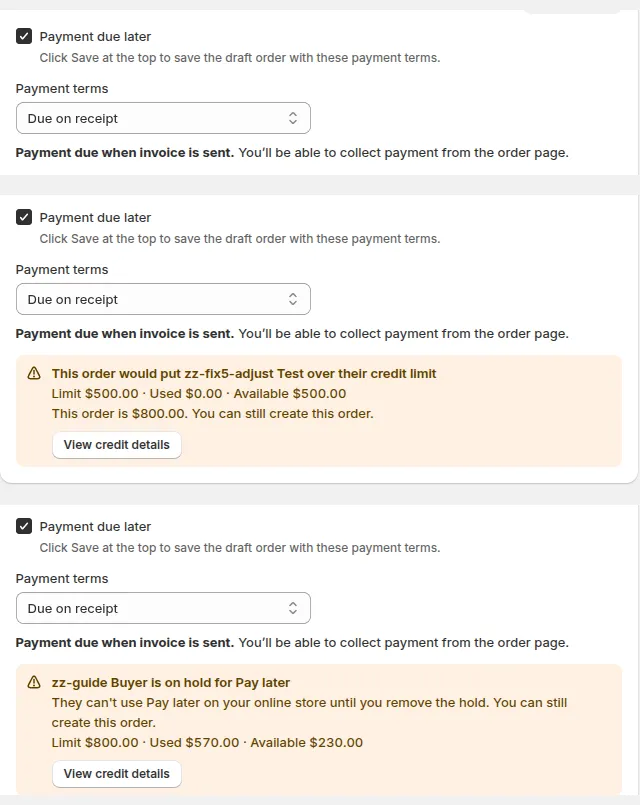
Would exceed, already over, on hold and overdue each have their own heading.
When does the warning appear?
Section titled “When does the warning appear?”The warning appears when Payment due later is ticked, payment terms are chosen, the order is not complete and a customer is selected. The check runs about 0.4 seconds after you change the customer or the total, and shows “Checking credit limit…” while it works.
It also needs a credit rule that covers the buyer. This table shows which rules the warning looks at.
| Rule that covers the buyer | Warning shows? |
|---|---|
| A rule for that customer | Yes |
| A rule for a customer tag the buyer has | Yes |
| A rule for all customers | Yes |
| Only a company or location rule | No |
| No rule | No |
If no rule applies, you see no banner, even when the buyer is on hold. The overdue banner needs Block Pay later when a customer has an overdue order to be on in Settings.
If the check cannot read the balance, it shows nothing and you can carry on. The check reads data only. It does not change any balance.
Does a Manual Order count toward the balance?
Section titled “Does a Manual Order count toward the balance?”Yes. A Manual Order with payment terms counts toward the buyer’s balance after you create it. Shopify reports the order to BSS B2B Solution, which adds it to Owed shortly after. Recalculate on the buyer’s credit page refreshes the figures.
The order counts when all of these are true:
- The order is created with BSS B2B Solution Manual Order and has payment terms.
- The Credit limit add-on is active.
- A credit rule covers the buyer.
- The order is in your store currency.
An order in another currency is skipped and does not count.
When the order is paid, cancelled, voided or refunded, it stops counting. The due date comes from the order’s first payment schedule.
What about orders I create in Shopify admin or at POS?
Section titled “What about orders I create in Shopify admin or at POS?”An order counts only when it carries payment terms and a company buyer, and a company or location rule applies to that buyer. The sales channel does not matter. Payment terms and the company are what decide.
| Order | Counts toward the balance? | What to do |
|---|---|---|
| Admin order with payment terms and a company buyer | Yes, when a company or location rule is active | Nothing |
| Admin order with payment terms, no company buyer | No | Add the amount with Adjust on the customer’s credit page |
| Admin order without payment terms | No | Add the amount with Adjust on the customer’s credit page |
| Admin draft order | No, drafts made in admin do not reserve credit | Add the amount with Adjust if the customer owes it |
| POS order with payment terms and a company buyer | Yes, by the same rule | Nothing |
| POS order with payment terms, no company buyer | No | Add the amount with Adjust |
| POS order without payment terms | No | Add the amount with Adjust |
| Order from the API without payment terms | No | Add the amount with Adjust |
Only drafts that went through the buyer’s Pay later checkout reserve credit as Pending.
To bring older or off-system amounts into the balance, use Opening balance (Edit) or Manual adjustments (Adjust) on the customer’s credit page. See how a customer’s balance is built and the customer credit page.
Can I create an order for a buyer who is over the limit or on hold?
Section titled “Can I create an order for a buyer who is over the limit or on hold?”Yes. The banner never blocks the order. You decide whether to go ahead.
The block that stops new Pay later orders is part of the buyer’s own checkout. It follows the rule’s Block Pay later or warn-only choice. Read more in credit rules.
To manage the orders you create, see managing Net Terms orders.
Why does the banner not show for my buyer?
Section titled “Why does the banner not show for my buyer?”Check that Payment due later is ticked, payment terms are chosen and a customer is selected. Then check that a customer, tag or all-customers rule covers the buyer. Company and location rules are not used by this banner. See troubleshooting Credit limit.
Does the banner stop me from saving the order?
Section titled “Does the banner stop me from saving the order?”No. Every banner says “You can still create this order.” The check only reads the balance.
Why is Used higher than what the buyer owes?
Section titled “Why is Used higher than what the buyer owes?”Used is owed plus pending Pay later drafts. Pending drafts are orders waiting for your review that already hold some of the buyer’s credit.
Does a paid or cancelled Manual Order still count?
Section titled “Does a paid or cancelled Manual Order still count?”No. Paid, cancelled, voided and refunded orders stop counting. The balance updates after Shopify reports the change.