
Order Limits
Order Limits lets you set minimum and maximum purchase thresholds for your B2B customers, by item quantity or order value.
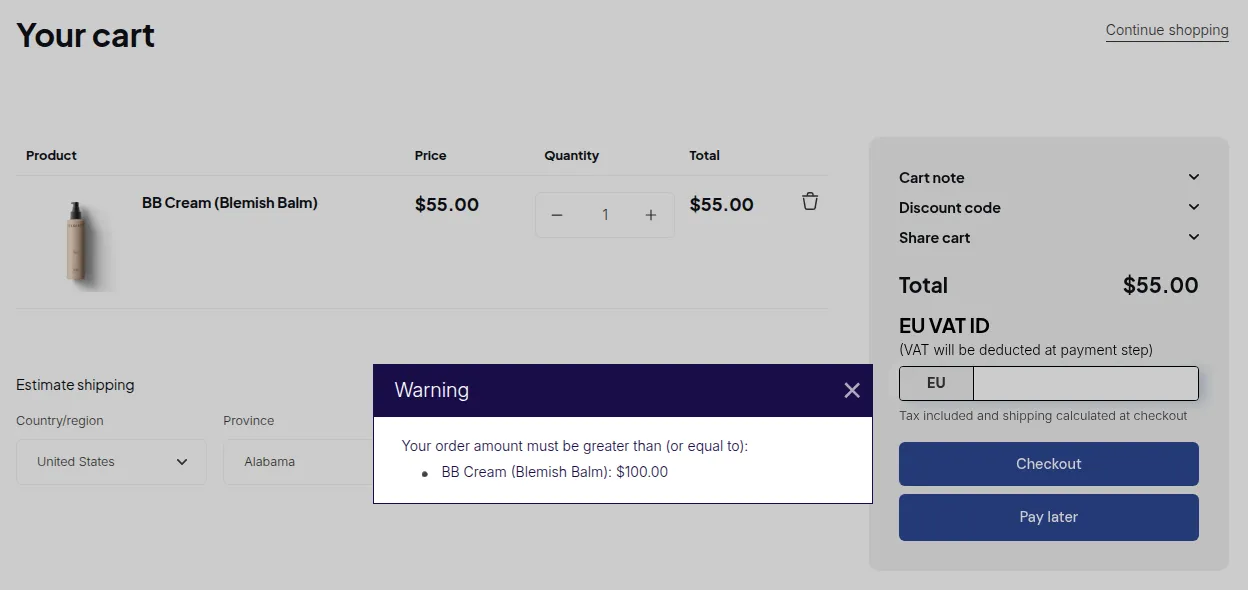
What your customers see on the storefront.
The Order Limits feature within the BSS B2B Solution app allows you to define purchase thresholds for your customers, ensuring that orders meet your business requirements. Whether you’re aiming to set a minimum purchase amount or a maximum quantity per order, this tool provides the flexibility to tailor your store’s purchasing rules.
What It Does
Section titled “What It Does”- Set minimum or maximum purchase thresholds (quantity or dollar amount)
- Apply rules to specific customers or customer groups
- Show clear guidance messages to customers when limits are not met
- Combine with Quantity Increments for complete order quantity control
The enforcement scope (per variant, per product, or total order) is a global setting for the whole module: you choose one scope that all rules share.
Key Features
Section titled “Key Features”- Flexible Rule Types: Choose between setting a minimum or maximum order quantity or amount, allowing you to control both the number of items and the total value of orders.
- Customer Segmentation: Apply rules to specific customers or customer tags, enabling targeted restrictions for different groups.
- Product-Specific Rules: Assign order limits to individual products, ensuring that certain items adhere to specific purchasing guidelines.
- Clear Customer Notifications: When customers attempt to checkout with quantities or amounts that don’t meet the set limits, they’ll receive clear messages, guiding them to adjust their orders accordingly.
Common Use Cases
Section titled “Common Use Cases”| Use Case | Rule Type |
|---|---|
| Enforce minimum wholesale order | Minimum Order Amount = $200 |
| Cap orders for limited-stock items | Maximum Order Quantity = 50 units |
| Require minimum quantity per product | Minimum Order Quantity (module scope: per product) |
| Prevent over-ordering across the whole cart | Maximum Order Quantity (module scope: total order) |