
Sales Reps Add-on: Let Reps Place B2B Orders for Customers
The Sales Reps add-on lets the sales reps you choose place draft orders for the companies and customers you assign to them. Each rep signs in to your online store with a customer account and orders from a rep portal at the customer’s B2B price. You see every order in Shopify, and you track commission by rep. Add it from Pricing plans > Add-ons.
Key takeaways
Section titled “Key takeaways”- Sales Reps is an add-on for stores on a plan with Net Terms (Advanced or Platinum).
- It includes 3 active reps. From the fourth rep, each extra rep costs $9 per 30 days.
- A rep orders only for the company locations and customers you assign.
- Prices follow the customer’s B2B price. A rep can lower a price only within the Maximum discount you set.
- Reps create draft orders. You complete or invoice them in Shopify.
- Commission is worked out per rep, and you mark it as paid.
- Sales rep portal is in English for now. Your reps see English text, whatever language your store uses.
Who is Sales Reps for?
Section titled “Who is Sales Reps for?”It is for stores where your own team sells to B2B buyers. A rep might take an order by phone, or visit a buyer and order on the spot. The buyer does not need to place the order alone.
Sales Reps does not replace Manual Orders. Manual Orders is for you and your staff in the Shopify admin. Sales Reps gives your reps their own page on your storefront, with no Shopify staff account.
How does it work?
Section titled “How does it work?”A rep is a Shopify customer account that you turn into a rep. The rep signs in to your store and opens the rep portal. In the portal the rep chooses one of the customers you assigned, adds products and creates a draft order.
- You add the add-on and turn on Sales Reps. See get started.
- You allow access to your product catalog, add reps and turn on the portal in your theme. See add reps.
- You assign company locations and customers to each rep. See assign customers.
- The rep creates draft orders in the portal. See the rep portal.
- You complete the drafts in Shopify and pay commission. See commission.
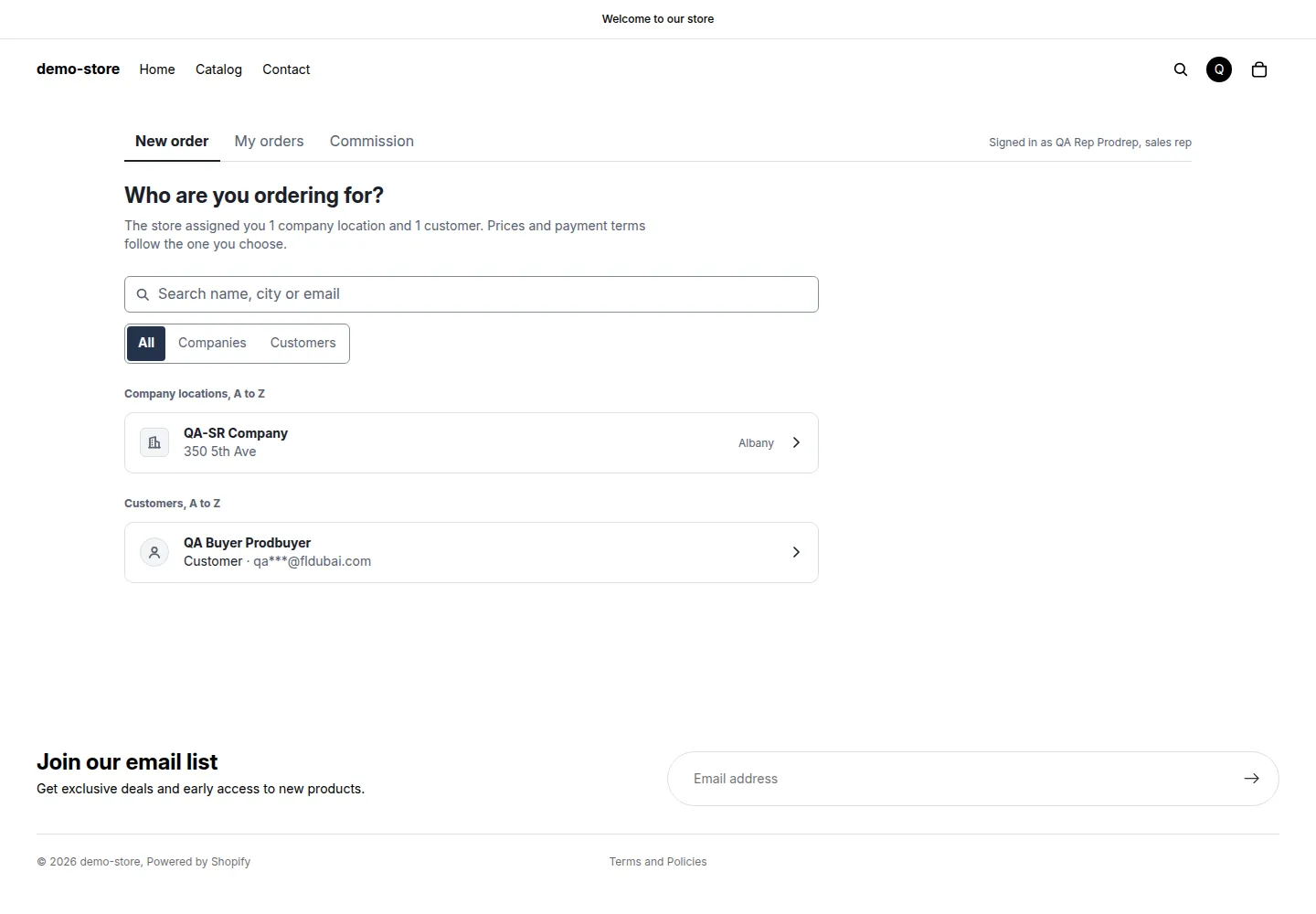
The rep portal asks who the rep is ordering for.
What can a rep do, and what stays with you?
Section titled “What can a rep do, and what stays with you?”| Task | Rep | You |
|---|---|---|
| Choose a customer from the assigned list | Yes | You assign the list |
| See the customer’s B2B price | Yes | You set pricing rules as usual |
| Lower a price | Within Maximum discount | You set the percentage |
| Raise a price | Yes. The portal flags the line to the rep | You see it in Activity log |
| Create a draft order | Yes | You complete or invoice it in Shopify |
| Email the invoice to the customer | Yes, from the review step | You can send it from the draft instead |
| Use a discount code | No | See prices and the maximum discount |
| You see them in Report and in Shopify Orders (drafts under Orders > Drafts). |
What do I need first?
Section titled “What do I need first?”- A plan with Net Terms (Advanced or Platinum). Check Pricing plans.
- A customer account for each rep. The rep does not need a Shopify staff account.
- B2B prices set up for the companies and customers the reps will serve. The portal uses the same prices as your storefront.
- The permission Allow access to your product catalog. Shopify asks for it once. Without it, reps cannot create orders.
What should I do first?
Section titled “What should I do first?”Start the free trial, allow access to your product catalog, add one rep and assign one customer. Turn on the portal in your theme, then sign in as the rep and create a test draft order. Delete the draft in Shopify when you are done.
The Reps tab guides you with a block called Get started with Sales Reps. It lists three steps: Turn on Sales Reps, Add a rep and assign customers and Turn on the app embed “BSS Sales rep portal”. The block shows how many steps are done, and you can click Hide to close it.
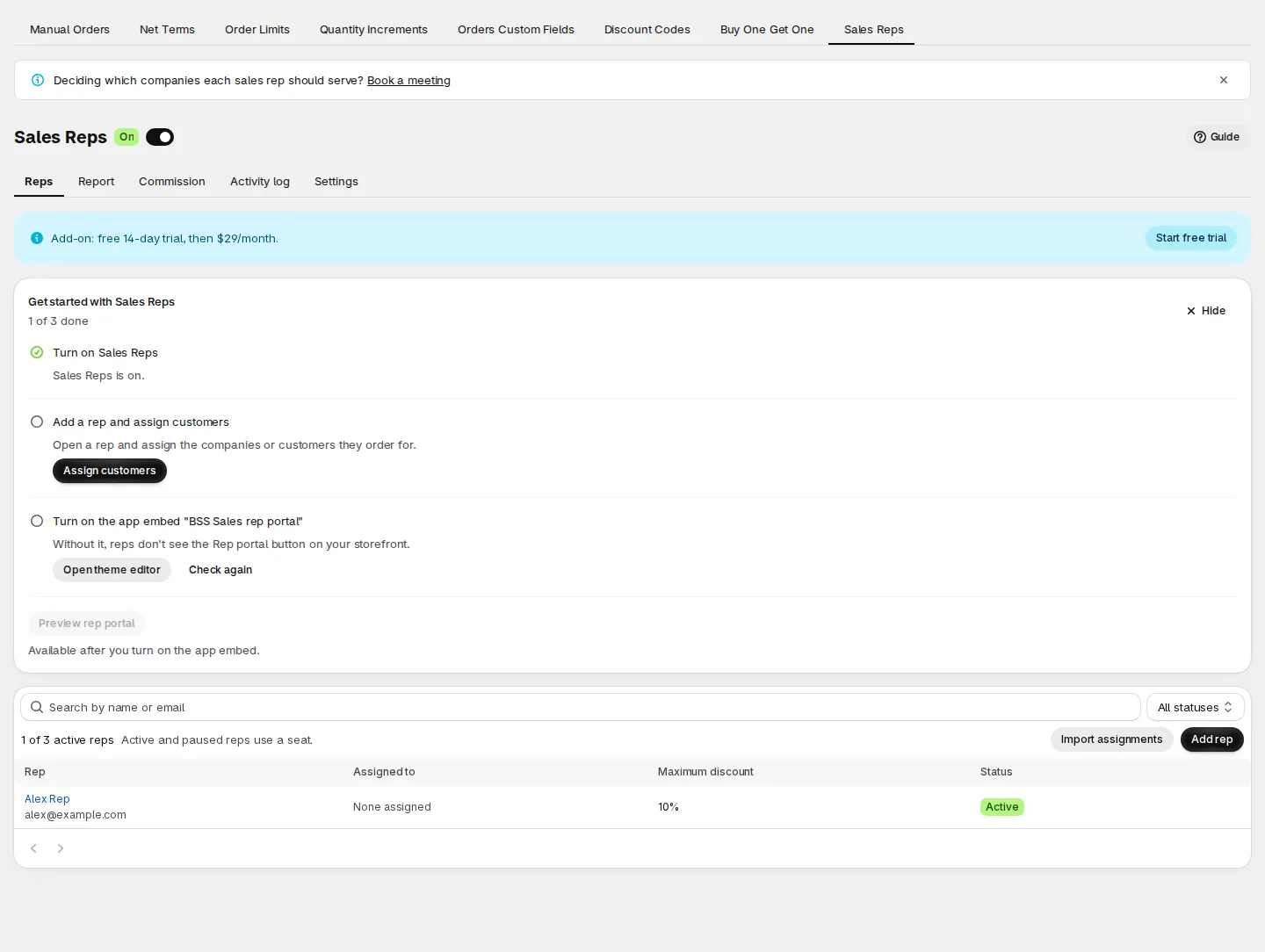
The Get started block on the Reps tab shows what is left to do.
If a term is new to you, the Sales Reps glossary defines it. Common questions are in the Sales Reps FAQ.