
Set Up Employee Pricing for Internal Sales in BSS B2B Solution
Internal sales or employee purchase lets you offer special pricing to employees while keeping your regular retail pricing unchanged for other customers.
This setup is useful if you want to run an employee purchase program without affecting the experience for B2C shoppers or other wholesale buyers and this use case is also helpful when your store already uses promotions such as free gifts, bundle offers, or cart-based conditions. Availability may vary by plan/setup, buyer group configuration, theme behavior, and any third-party apps that also affect pricing or cart behavior.
Quick recommendation
Create a dedicated buyer group or customer tag for employees, then apply a separate pricing rule to that group only. This is the safest and easiest way to manage employee pricing and keep other promotions working as expected.
# On this page
Section titled “# On this page”- Eligibility requirements
- Understanding internal sales
- What you can do with this setup
- Where it applies
- Availability and limitations
- How to configure it
- How to verify it works
- Third-party support
# Eligibility requirements
Section titled “# Eligibility requirements”To use internal sales / employee purchase, your store should meet these requirements:
- You run a B2B-only or hybrid store and need different pricing for a specific group of buyers.
- You can assign employees to a dedicated buyer group or customer tag.
- You already have products that should be available at employee pricing.
- You want employees to see a special price after logging in.
- You want to keep existing promotion logic that depends on the original Shopify product or variant.
- You use BSS B2B Solution with pricing features enabled for your current setup.
- You have permission to manage customer groups, pricing rules, and storefront configuration.
# Understanding internal sales
Section titled “# Understanding internal sales”# What it is
Section titled “# What it is”Internal sales is a pricing setup that gives employees or internal buyers a special price for the same products sold in your store.
Employees still purchase the original Shopify product. They simply see a different price when they log in with an eligible account.
# What you can do
Section titled “# What you can do”With this setup, you can:
- Offer employee-only pricing
- Keep regular retail pricing for all other customers
- Use the same product catalog without creating duplicate products
- Support employee purchase programs for staff or internal teams
- Keep cart-based promotions such as free gifts or bundle conditions
# Where it applies
Section titled “# Where it applies”This use case usually applies in these areas:
- Product pages
- Collection pages
- Cart pages
- Other storefront areas where pricing is shown based on buyer group
A key point is that BSS only calculates and displays the discounted price. The original Shopify Product ID and Variant ID stay the same.
This means that if your store uses logic like “add a free gift when Product A is added to cart,” that logic can still identify the original product correctly.
# Availability & limitations
Section titled “# Availability & limitations”This use case is supported depending on how your store is configured.
| Condition | Status |
|---|---|
| B2B-only store | Supported |
| Hybrid B2C + B2B store | Supported |
| Employee access managed by buyer groups or customer tags | Recommended |
| Need employee pricing without creating duplicate products | Supported |
| Promotions based on product_id or variant_id | Supported |
| Third-party apps that replace or rebuild cart line items | Needs extra testing |
| Logic based on line item key | Not recommended |
| Final behavior depends on plan/setup | May vary |
# Known limitations
Section titled “# Known limitations”- This setup does not create a separate product for employees.
- This setup does not change the Shopify Product ID or Variant ID.
- If a third-party app changes how cart items are handled, some promotions may need additional testing.
- If your store uses several apps that affect discounts, gifts, or cart logic at the same time, results may vary.
- Actual availability may depend on your plan, theme setup, or checkout setup.
# Adding/configuring
Section titled “# Adding/configuring”# Step 1: Create an employee buyer group
Section titled “# Step 1: Create an employee buyer group”- Go to Customers
- Click Customer segments or your buyer group management area
- Select the group for employees
- Set a clear tag such as employee
- Save
Note
- Use a dedicated group or tag for employees only.
- Do not mix employee accounts with other wholesale groups if they need different pricing or benefits.
# Step 2: Create an employee pricing rule
Section titled “# Step 2: Create an employee pricing rule”- Go to BSS B2B Solution
- Click Pricing
- Select Price list, Custom pricing, or the pricing method that matches your setup
- Set the rule to apply to the employee buyer group
- Select the products or variants to include
- Set the employee price or discount
- Save
- Activate
Note
- Apply the rule only to the employee group to avoid showing internal pricing to regular customers.
- If you need different pricing by team or role, create separate buyer groups instead of using one shared rule.
# Step 3: Verify the storefront result
Section titled “# Step 3: Verify the storefront result”- Go to your storefront
- Click Log in
- Select an employee account with the correct tag
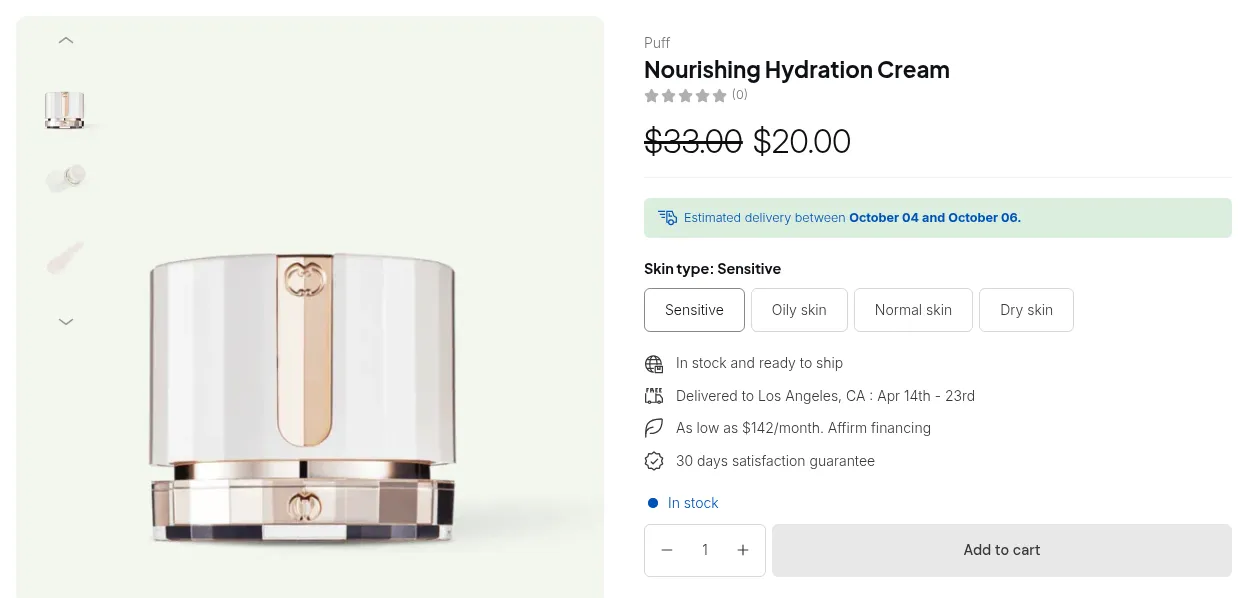
- Go to a product page with employee pricing
- Check the displayed price
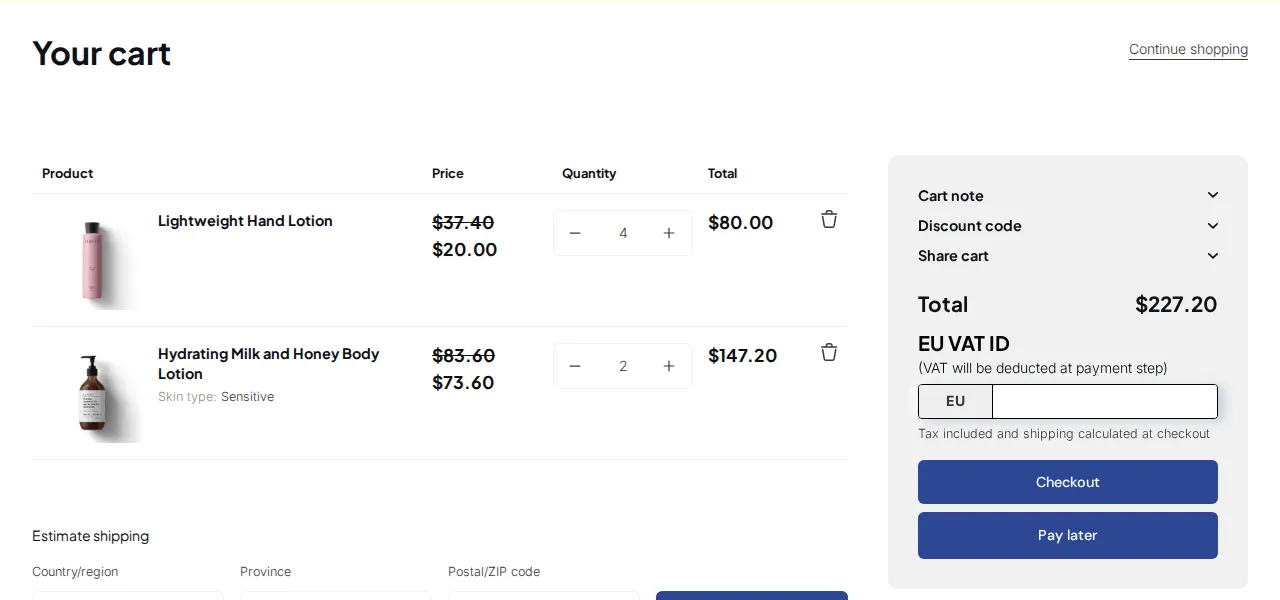
- Add the product to cart
- Check the cart price
- Check any free gift or cart-based promotion if applicable
Caution
- If the price does not change, check the customer tag first.
- If the gift offer does not work, check whether your promotion app uses product_id, variant_id, or line item key.
# Step 4: Test with a regular customer account
Section titled “# Step 4: Test with a regular customer account”- Go to your storefront
- Log out
- Log in with a regular customer account
- Go to the same product
- Check the displayed price
- Add the product to cart
- Check the cart behavior
Best practice
- Always test with at least two account types:
- One employee account
- One regular customer account
This helps confirm that the pricing rule only applies to the intended buyers.
# Third-party support
Section titled “# Third-party support”If you use third-party apps for free gifts, bundles, discounts, or cart validation, keep these points in mind:
- BSS keeps the original Shopify Product ID and Variant ID
- Promotions based on the original product or variant can usually continue to work
- Apps that check conditions by product_id or variant_id are recommended
- Apps that depend heavily on line item key may need extra review
# Example
Section titled “# Example”A merchant wants employees to buy Product A at a discounted price and still receive a free gift when that product is added to the cart.
Recommended setup:
- Assign the tag employee to employee accounts
- Create a pricing rule for the employee group
- Apply employee pricing to Product A
- Keep the free gift logic based on product_id or variant_id
Expected outcome:
- Employees log in and see the discounted price
- Regular customers still see the standard price
- When Product A is added to cart, the gift app can still identify the product correctly
- The merchant does not need to create a duplicate product just for internal sales
# Troubleshooting & Edge Cases
Section titled “# Troubleshooting & Edge Cases”Reach out to our support team if:
- Employee pricing does not display correctly
- Regular customers can still see internal pricing
- Free gifts or promotions do not work as expected
- Your store uses multiple apps that affect pricing or cart behavior
- You need help confirming whether your current setup supports the internal sales use case